All articles Download
Download App9 min5 min6 min
4 min read
How to Analyze Chess Games for Free (PGN Files + Stockfish)
Learn how to analyze chess games for free using PGN files and Stockfish. A complete guide to importing, reviewing, and tracking your games locally without subscriptions.
Chess Analyzer Pro
A fast, free, and open-source desktop app for unlimited local game analysis.
If you play chess online, whether on Chess.com, Lichess, or over the board, you probably want to review your games afterward. Every strong player does it. It is how you spot patterns in your mistakes and find the moves you missed.
But most platforms limit how many games you can analyze for free. Chess.com gives you one full Game Review per day. Lichess offers free analysis, but it runs in your browser through WebAssembly. It is slower than native, and you need an internet connection.
The best way to analyze chess games for free is to do it locally with Stockfish. For a comparison of the best free analysis tools, see Best Free Stockfish GUIs for Chess Analysis.
Here is exactly how.
What You Need
To analyze chess games on your own machine, you need two things:
- A desktop chess analysis tool. Something that can load PGN files and talk to a chess engine.
- Stockfish. The strongest free chess engine available.
Once you have both set up, you can analyze unlimited games with no restrictions.
Step 1: Get an Analysis Tool
Chess Analyzer Pro is a free, open-source desktop application built for this exact purpose. It runs on Windows, macOS, and Linux.
Download it here for your platform. No account needed, no subscription, no ads.
Step 2: Download Stockfish
Stockfish is the engine that evaluates your games. Go to stockfishchess.org/download/ and download the binary for your OS:
- Windows. Choose the AVX2 build if your CPU supports it. Otherwise go with the modern build.
- macOS. Pick the Apple Silicon build if you have an M-series Mac. Otherwise go with BMI2 or modern.
- Linux. Same as Windows. AVX2 if supported, modern otherwise.
No installer needed. It is a single executable file. Put it somewhere permanent like C:\ChessEngines\ or ~/chess/.
Step 3: Connect Them
Open Chess Analyzer Pro. Go to Settings and click Chess Engine. Click Browse and select your Stockfish binary. Click Test Engine. If you see a green checkmark, you are ready.
Step 4: Import Your PGN
PGN stands for Portable Game Notation. It is the standard format for chess games. Every major platform exports it.
Click Load Game (or press Ctrl+O). You will see four tabs:
- PGN File. Drag and drop a .pgn file or click to browse.
- PGN Text. Paste raw PGN notation directly.
- Chess.com. Enter your Chess.com username or a game URL.
- Lichess. Enter your Lichess username or a game URL.
If your PGN has multiple games, the app shows them as a list. Double-click the one you want to analyze.
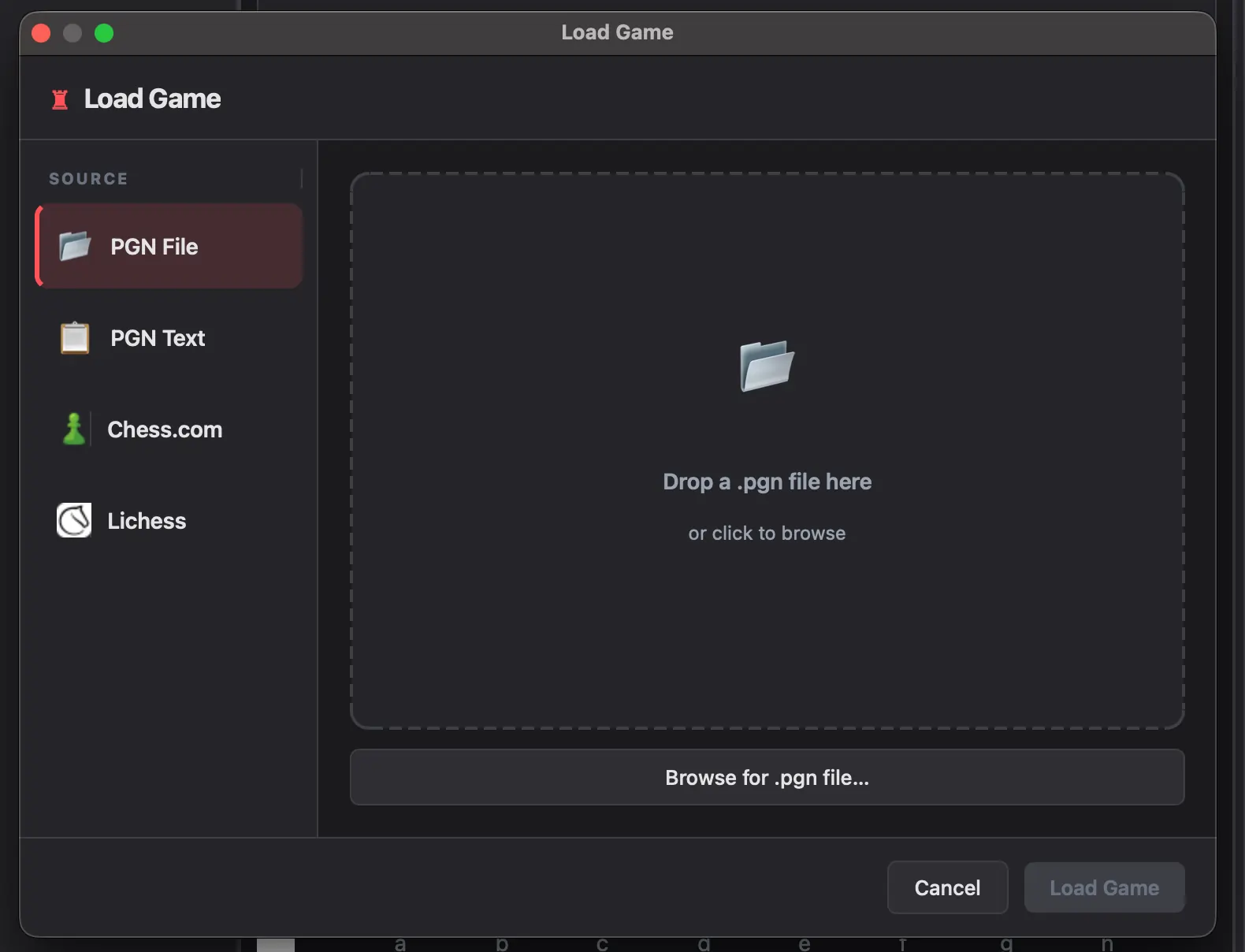 Unified load dialog with PGN File, PGN Text, Chess.com, and Lichess tabs
Step 5: Analyze
With the game loaded, click Analyze Game. Stockfish evaluates every move one by one. A typical 40-move game at depth 18 takes about 30 to 60 seconds on a modern laptop.
When analysis finishes, every move has:
- A classification icon: Brilliant, Great, Best, Excellent, Good, Inaccuracy, Mistake, Blunder, or Miss
- An evaluation score in centipawns
- The best engine line for that position
- An accuracy percentage per move
The evaluation graph at the top shows the game's flow. Sharp spikes mean something interesting happened. Maybe a tactic was found or a mistake was made.
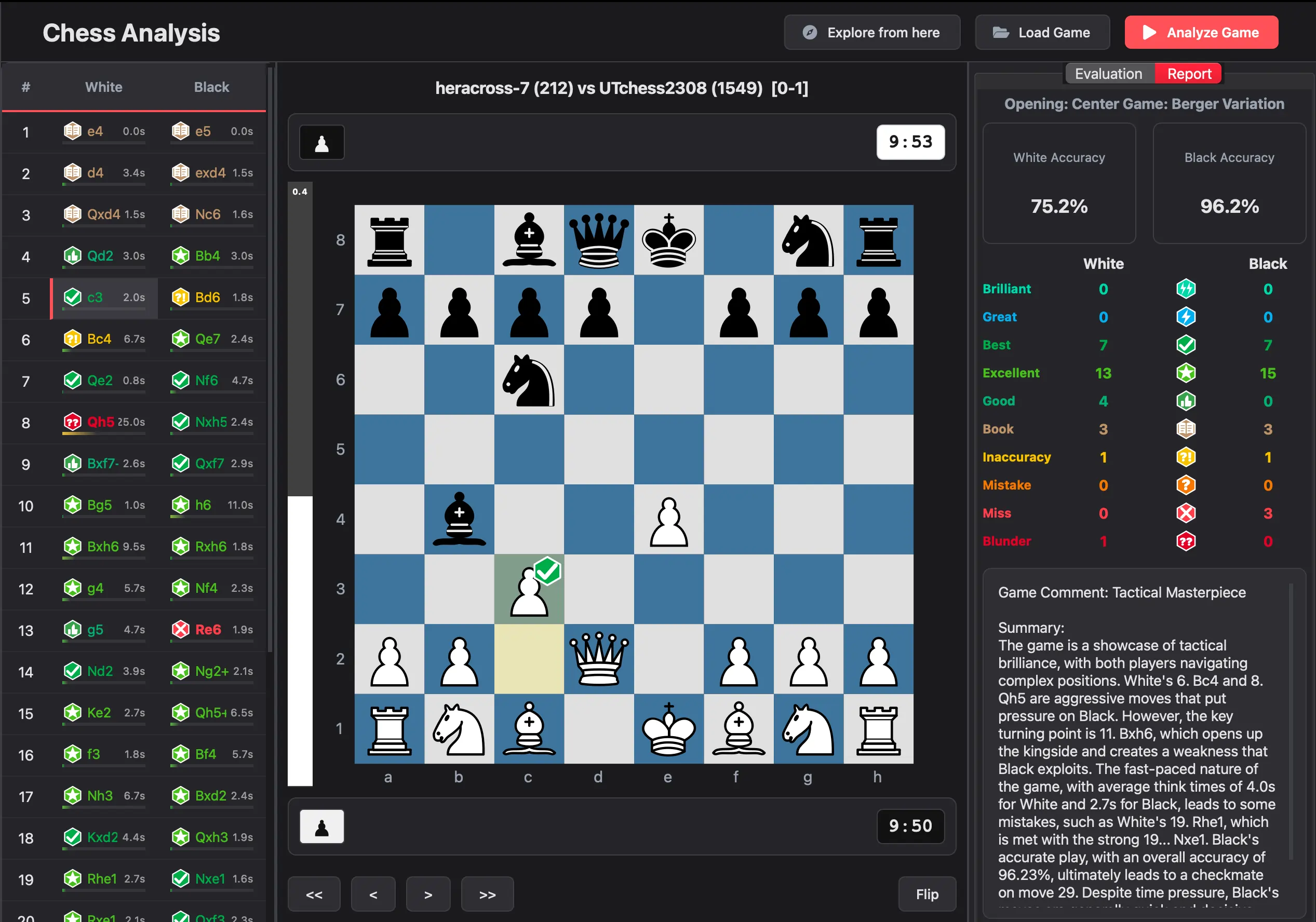 Completed analysis — move list with classification icons, eval graph, and accuracy scores
What You Get After Analysis
After the engine finishes:
- Every move is classified and scored
- The overall game accuracy is calculated using a volatility-weighted harmonic mean
- An opening name is identified
- The game is saved to a local SQLite database
- You can export your analysis history to CSV
All of this happens locally. No data leaves your machine.
Going Further
Once you have the basics working, you can:
- Adjust engine settings. Increase depth, threads, or hash for deeper analysis.
- Use Multi-PV. See the top 3 to 5 engine suggestions instead of just the best move.
- Generate AI summaries. An optional feature that sends the PGN to an LLM for a plain-English game recap.
- Track performance over time. The metrics dashboard shows accuracy trends, opening performance, and more.
The Bottom Line
Analyzing chess games for free is straightforward. Download a local tool, connect Stockfish, import your PGN, and review unlimited games. No subscriptions, no daily limits, no data uploads.
Download Chess Analyzer Pro and start reviewing your games today.
Links
- Download the app: chessanalyzer.xyz/releases
- GitHub Repository: github.com/imutkarsht/Chess_analyzer
- Stockfish Engine: stockfishchess.org/download/
Try Chess Analyzer Pro
Analyze games with Stockfish offline, review blunders, and track your performance—100% free.
Written by
Utkarsh Tiwari
More from the blog
Chess Analyzer Pro v2.3.0: Complete Light Mode, Live Stockfish Analysis & Lichess Opening Explorer
Chess Analyzer Pro v2.3.0 is out. Featuring a full Light Mode with dynamic theming, real-time progressive Stockfish analysis, Lichess Opening Explorer integration, and redesigned game history.
Best Free Stockfish GUIs for Chess Analysis (2026 Guide)
Compare the best free Stockfish GUIs for chess analysis — Arena, Banksia GUI, Chess Analyzer Pro, Scid vs PC, and more. Find the right tool for local analysis.
Chess Analyzer Pro v2.2.0: Custom Themes, Setup Wizard & A Much Better First Day
v2.2.0 is out. This release focuses on the things that matter before you analyze your first game - getting the engine running, looking the way you want, and knowing where everything is.