All articles Download
Download App9 min5 min6 min
3 min read
Chess Analyzer Pro v2.1.0: Analysis Explorer, Polyglot Books, and Auto-Updates
The latest release of Chess Analyzer Pro adds an interactive opening explorer, support for Polyglot opening books, and cross-platform auto-updates. Here's what changed.
Chess Analyzer Pro
A fast, free, and open-source desktop app for unlimited local game analysis.
Version 2.1.0 is out.
This release has been in the works for a while. It adds three major features, fixes a handful of lingering bugs, and restructures the code in ways you won't see but should make future updates faster.
Here's what actually changed.
Analysis Explorer
The main new feature is the Analysis Explorer . a dedicated view with its own board where you can explore positions independently from the main analysis.
It works like this: from any analyzed game, click "Explore from here." This opens the Explorer tab with the current position loaded. You now have:
- An independent chess board with drag-and-drop piece movement
- Live Stockfish analysis running on the current position
- Opening book suggestions from both the local SQLite database and Polyglot
.binfiles - Move classification on explored lines
- Inline SAN text input . type
Nf3and the board responds - Copy FEN and Copy PGN buttons
The Explorer tab stays open when you switch back to the main analysis. You can use it to test variations without disturbing your primary game review.
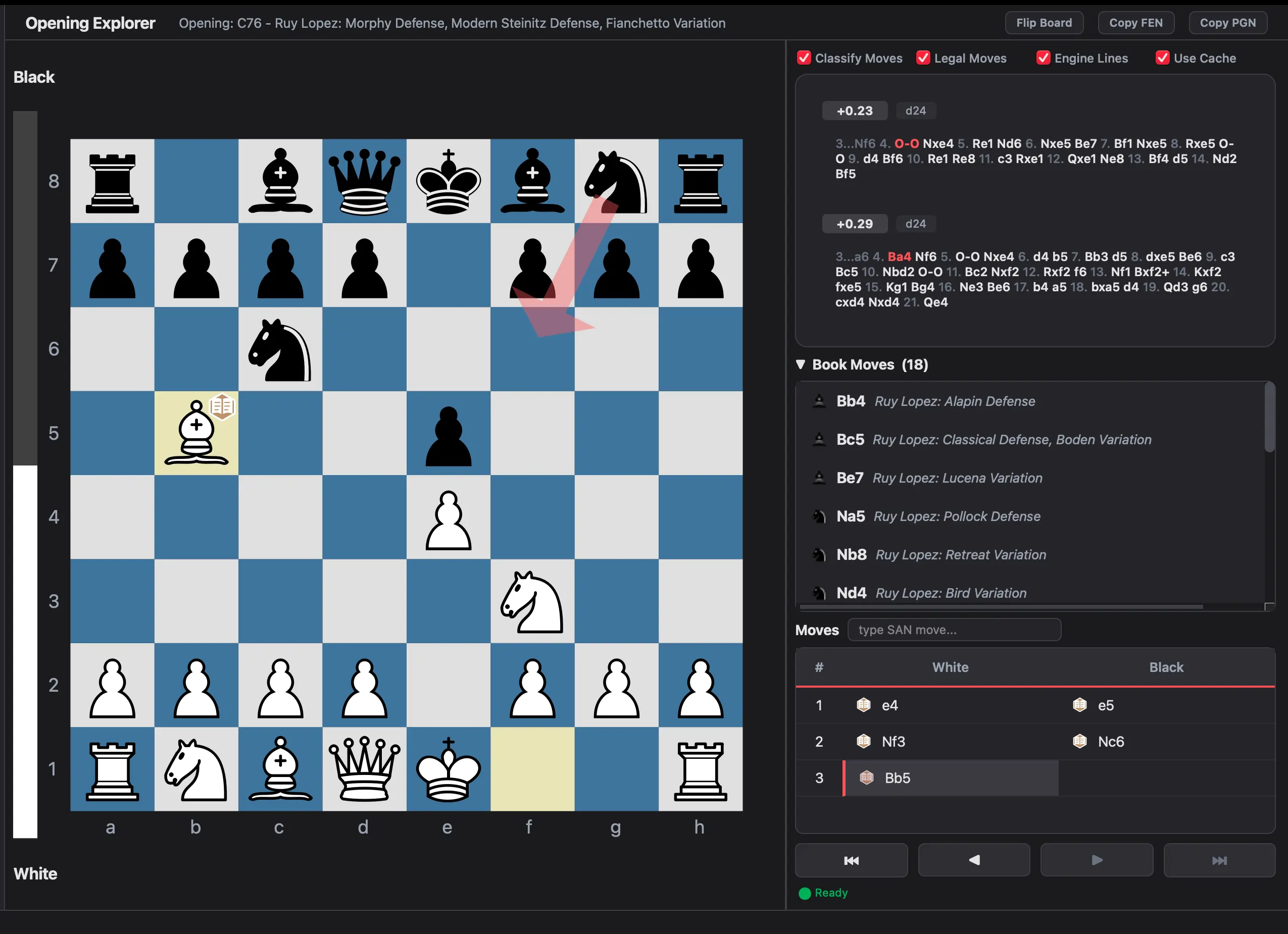 Analysis Explorer — independent board with engine lines and book moves
Polyglot Opening Books
Chess Analyzer Pro now supports Polyglot binary opening books (.bin files). If you have a Polyglot book with your preferred opening repertoire, you can load it in Settings → Book Settings.
The app checks book moves during analysis and marks them appropriately. Book moves are shown with classification icons in the Explorer's move list, and the book section is collapsible.
This is in addition to the existing local SQLite opening database, which is built from the Lichess ECO dataset and works out of the box.
Cross-Platform Auto-Updates
The app now checks for updates on startup. When a new version is available, it shows a dialog with the changelog.
The update installers are platform-native:
- Windows: Inno Setup installer with silent upgrade
- macOS: DMG that opens in Finder after stripping quarantine attributes
- Linux: AppImage hot-swap. The old file is replaced, and the new one is launched
The update mechanism uses GitHub Releases to check for new versions and download the appropriate asset for your platform.
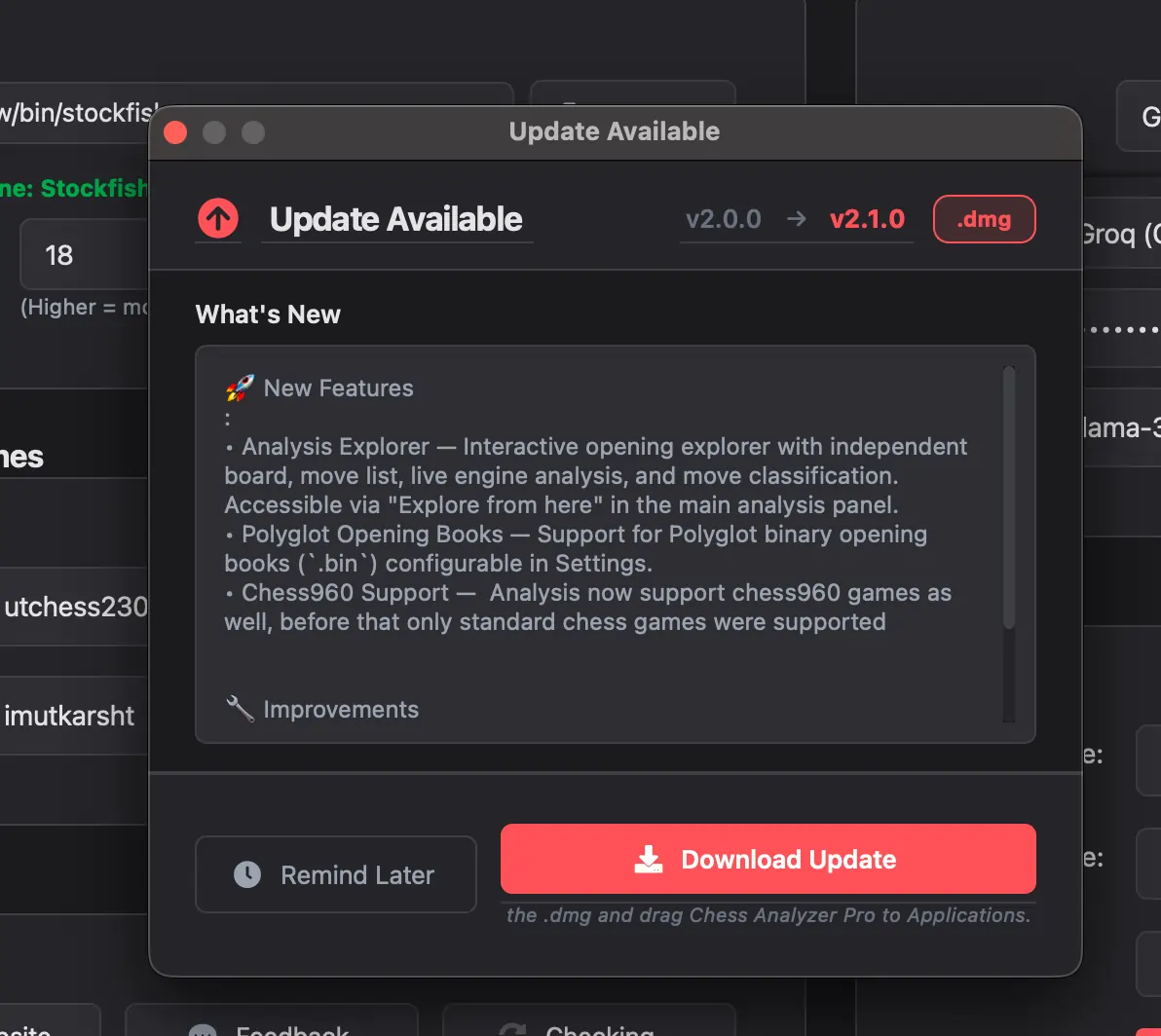 Auto-update dialog showing changelog and download button
Other Changes
Accuracy Tuning
The classification algorithm was adjusted to better match expected behavior:
- Blunder/Mistake/Inaccuracy thresholds were tightened
- Blunder now takes priority over Miss in the classification order
- Book move detection has a cooldown to prevent early exits from known lines
- The accuracy decay constant was increased for better Chess.com alignment
Chess960 Fix
Chess960 (Fischer Random) games now work correctly through the entire pipeline. The Chess960 flag persists across game saving, loading, CSV export, and CSV import. Earlier versions could lose this flag during export.
Code Restructuring
The backend and GUI code was reorganized into cleaner directory structures:
src/backend/analysis/,api/,services/,storage/,updater/src/gui/board/,analysis/,components/,dialogs/,views/,metrics/
This doesn't change anything you see, but it makes the codebase easier to maintain and contribute to.
Bug Fixes
- Fixed PGN export in AI summary generation (was missing the starting FEN header)
- Fixed crashes when switching between PGN loading and history views
- Fixed engine analysis freeze when switching between Polyglot and internal books
- Fixed configuration reloading and API profile validation
- Fixed Windows installer build issues
Upgrading
If you already have Chess Analyzer Pro installed, the app will notify you about the update on startup. Click the notification to download and install.
If you're downloading for the first time, grab the latest release from the downloads page:
- Windows:
.exeinstaller - macOS:
.dmg - Linux:
.AppImage
Links
- Download v2.1.0: chessanalyzer.xyz/releases
- GitHub Repository: github.com/imutkarsht/Chess_analyzer
- Full Changelog: chessanalyzer.xyz/docs/patch-notes
Try Chess Analyzer Pro
Analyze games with Stockfish offline, review blunders, and track your performance—100% free.
Written by
Utkarsh Tiwari
More from the blog
Chess Analyzer Pro v2.3.0: Complete Light Mode, Live Stockfish Analysis & Lichess Opening Explorer
Chess Analyzer Pro v2.3.0 is out. Featuring a full Light Mode with dynamic theming, real-time progressive Stockfish analysis, Lichess Opening Explorer integration, and redesigned game history.
Best Free Stockfish GUIs for Chess Analysis (2026 Guide)
Compare the best free Stockfish GUIs for chess analysis — Arena, Banksia GUI, Chess Analyzer Pro, Scid vs PC, and more. Find the right tool for local analysis.
Chess Analyzer Pro v2.2.0: Custom Themes, Setup Wizard & A Much Better First Day
v2.2.0 is out. This release focuses on the things that matter before you analyze your first game - getting the engine running, looking the way you want, and knowing where everything is.