All articles Download
Download App9 min5 min6 min
5 min read
Chess.com Game Review Limit? Here's a Free Alternative
Hit the Chess.com game review limit again? Here's how to get unlimited free chess analysis with Stockfish running locally on your machine. No subscription needed.
Chess Analyzer Pro
A fast, free, and open-source desktop app for unlimited local game analysis.
You finish a great game. You want to review it, see where you went wrong, understand that tactical sequence you almost found.
You click Game Review.
And then you see it: you have used your free review for the day.
If you play more than one or two games a day, you have run into Chess.com's game review limit. Free accounts get one full Game Review per 24 hours. After that, you either get a simplified version or you pay for Diamond, which runs $9.99 to $15.99 a month.
I am not saying this is unreasonable. Cloud compute costs money. But when you play five or ten games in a session, waiting a day to review each one gets old fast.
There is a better way. Run Stockfish locally on your own machine. No limits, no subscriptions, and your data never leaves your computer. For a step-by-step setup guide, see How to Get Free Chess Analysis with Stockfish.
What Chess.com Game Review Actually Does
Chess.com's Game Review runs Stockfish on their servers. You click a button, their infrastructure evaluates your game, and you get back:
- An accuracy percentage (CAP, their Chess.com Accuracy Percentage)
- Move classifications: Brilliant, Great, Best, Excellent, Good, Inaccuracy, Mistake, Blunder
- A centipawn loss graph
- A game report with key moments
It is polished. It is instant. It works in your browser. The only real limitation is volume: one full review per day on the free tier.
How to Get Unlimited Free Game Review
The alternative is running Stockfish on your own computer. Here is why it works as a direct replacement.
No limits. You can analyze a hundred games in a row. There is no daily cap because you are not using someone else's compute.
Your data stays private. Games are analyzed locally. Nothing gets uploaded anywhere.
Full control. You can adjust CPU threads, hash memory, analysis depth, and how many alternative lines to show. Chess.com's Game Review gives you one fixed view. Local analysis lets you tune the engine however you want.
The trade-off is that it is not a one-click web experience. You need a desktop application that can run Stockfish and manage your game database.
That is where Chess Analyzer Pro comes in.
Chess Analyzer Pro: A Free, Open-Source Alternative
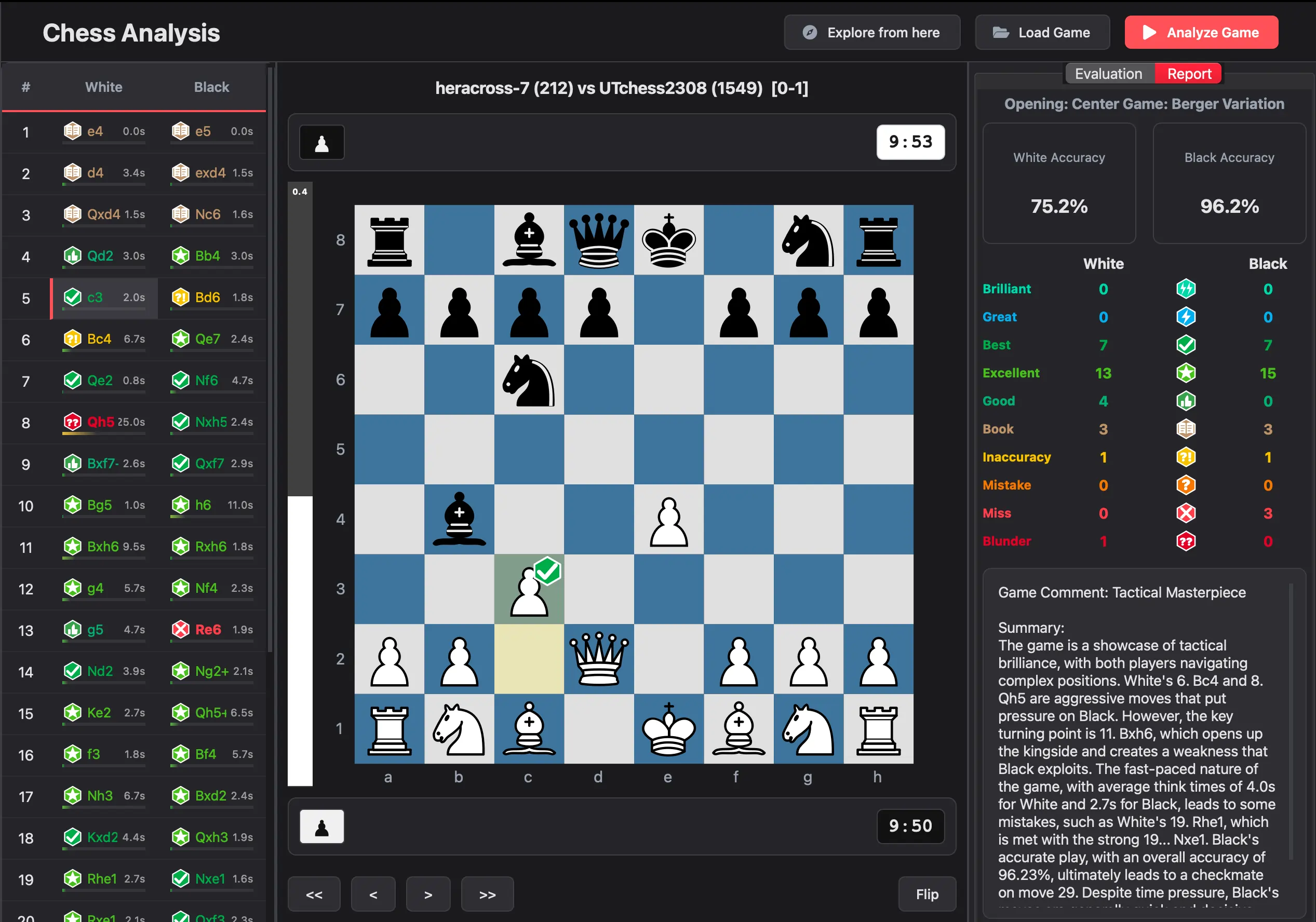 Chess Analyzer Pro — local analysis dashboard showing move classifications, evaluation graph, and engine lines
Chess Analyzer Pro is a desktop application that runs Stockfish locally on your machine. It is 100% free, open source under the MIT license, and works on Windows, macOS, and Linux.
Both tools serve the same purpose but take different approaches. Here is how they compare:
| Feature | Chess.com Game Review | Chess Analyzer Pro |
|---|---|---|
| Engine | Stockfish (cloud) | Stockfish (local) |
| Cost | Free (1/day) or Diamond ($9.99-$15.99/mo) | Free |
| Setup | None, works in browser | Download + configure Stockfish path |
| Analysis style | Guided tutorial, walks through key moments | Self-directed, full control over analysis |
| Move explanations | Built-in instructional text | Evaluation scores + engine lines (understand engine output yourself) |
| Unlimited analysis | No (1 full review/day free) | Yes |
| Works offline | No | Yes |
| Privacy | Games processed on cloud servers | Everything stays on your machine |
| Engine control | Configurable on Diamond | Adjustable threads, hash, depth, and Multi-PV |
| Game database | Cloud-based | Local SQLite, CSV export |
| Platform integration | Built into Chess.com | Import from Chess.com, Lichess, or PGN |
Chess.com's Game Review is polished and guided. You click a button and it walks you through your game with explanations. It works perfectly for quick, one-off reviews.
Chess Analyzer Pro is for players who want more. More control over the engine. More games analyzed in a single session. More privacy. No daily cap. No subscription. The tradeoff is that it requires some setup and you navigate the analysis yourself rather than following a guided tour.
Choose what fits your workflow. If you play a few games and want a quick, guided review, Chess.com does that well. If you play regularly and want unlimited, private, offline analysis with full engine control, Chess Analyzer Pro is built for you.
How It Works
- Download Chess Analyzer Pro for your OS
- Download Stockfish (it's free)
- Point the app to Stockfish in Settings, under Chess Engine
- Import your games by pasting a Chess.com game URL, entering your username, or dragging in a PGN file
- Click Analyze Game and Stockfish evaluates every move locally
You can import games from Chess.com directly using their public API. Just paste your game URL or enter your Chess.com username, and the app fetches your recent games.
Why Accuracy Scores Do Not Match Exactly
Chess.com's accuracy scores and Chess Analyzer Pro's scores will not be identical.
Chess.com uses their own CAP formula that factors in centipawn loss, move consistency, and position complexity. Chess Analyzer Pro uses a volatility-weighted harmonic mean, originally inspired by Lichess's approach but independently tuned.
The scores land in a similar range, but they are different tools measuring the same thing in slightly different ways. Both work fine for tracking improvement over time.
The Bottom Line
If you hit Chess.com's free game review limit regularly, local analysis is the best alternative. You get unlimited reviews, full privacy, and complete control over the engine, all for free.
Download Chess Analyzer Pro and start analyzing your games without limits.
Links
- Chess Analyzer Pro GitHub: github.com/imutkarsht/Chess_analyzer
- Download the app: chessanalyzer.xyz/releases
- Stockfish Engine: stockfishchess.org/download/
Try Chess Analyzer Pro
Analyze games with Stockfish offline, review blunders, and track your performance—100% free.
Written by
Utkarsh Tiwari
More from the blog
Chess Analyzer Pro v2.3.0: Complete Light Mode, Live Stockfish Analysis & Lichess Opening Explorer
Chess Analyzer Pro v2.3.0 is out. Featuring a full Light Mode with dynamic theming, real-time progressive Stockfish analysis, Lichess Opening Explorer integration, and redesigned game history.
Best Free Stockfish GUIs for Chess Analysis (2026 Guide)
Compare the best free Stockfish GUIs for chess analysis — Arena, Banksia GUI, Chess Analyzer Pro, Scid vs PC, and more. Find the right tool for local analysis.
Chess Analyzer Pro v2.2.0: Custom Themes, Setup Wizard & A Much Better First Day
v2.2.0 is out. This release focuses on the things that matter before you analyze your first game - getting the engine running, looking the way you want, and knowing where everything is.