All articles Download
Download App9 min6 min3 min
5 min read
Best Free Stockfish GUIs for Chess Analysis (2026 Guide)
Compare the best free Stockfish GUIs for chess analysis — Arena, Banksia GUI, Chess Analyzer Pro, Scid vs PC, and more. Find the right tool for local analysis.
Chess Analyzer Pro
A fast, free, and open-source desktop app for unlimited local game analysis.
If you want to run Stockfish locally for serious chess analysis, you need a GUI — a graphical interface that talks to the engine and shows you the results.
There are several free options. Each one takes a different approach. Here is how they compare.
Why Use a Stockfish GUI at All?
Stockfish itself is a command-line engine. It takes positions as text, calculates, and returns evaluations. Without a GUI, you type commands into a terminal.
A GUI gives you:
- A visual chess board
- Move entry and navigation
- Engine output displayed on the board
- Game database management
- Analysis tools (opening explorer, perft, etc.)
All the tools below are free. None of them require a subscription.
The Contenders
| Feature | Chess Analyzer Pro | Arena | Banksia GUI | Scid vs PC | Lichess Analysis Board |
|---|---|---|---|---|---|
| Platform | Windows, macOS, Linux | Windows (Wine on others) | Windows, macOS, Linux | Windows, macOS, Linux | Web browser |
| Installation | Download binary | Installer | Download + Java | Installer | None |
| Engine | Stockfish (external) | Stockfish (external) | Stockfish (external) | Stockfish (external) | Stockfish (WASM, browser) |
| Analysis depth | Configurable 10–25 | Configurable | Configurable | Configurable | Fixed |
| Move classification | Brilliant → Blunder (9 tiers) | Engine eval only | Engine eval only | Engine eval only | Engine eval only |
| AI coach | Yes (LLM integration) | No | No | No | No |
| Game database | Local SQLite | PGN-based | PGN-based | Local SQLite | Cloud-based |
| Offline | Yes | Yes | Yes | Yes | No |
| Privacy | 100% local | 100% local | 100% local | 100% local | Cloud analysis |
| Open source | Yes (MIT) | Yes | Yes (GPL) | Yes (GPL) | Yes (AGPL) |
| Import sources | Chess.com, Lichess, PGN | PGN | PGN | PGN | PGN, Lichess |
Chess Analyzer Pro
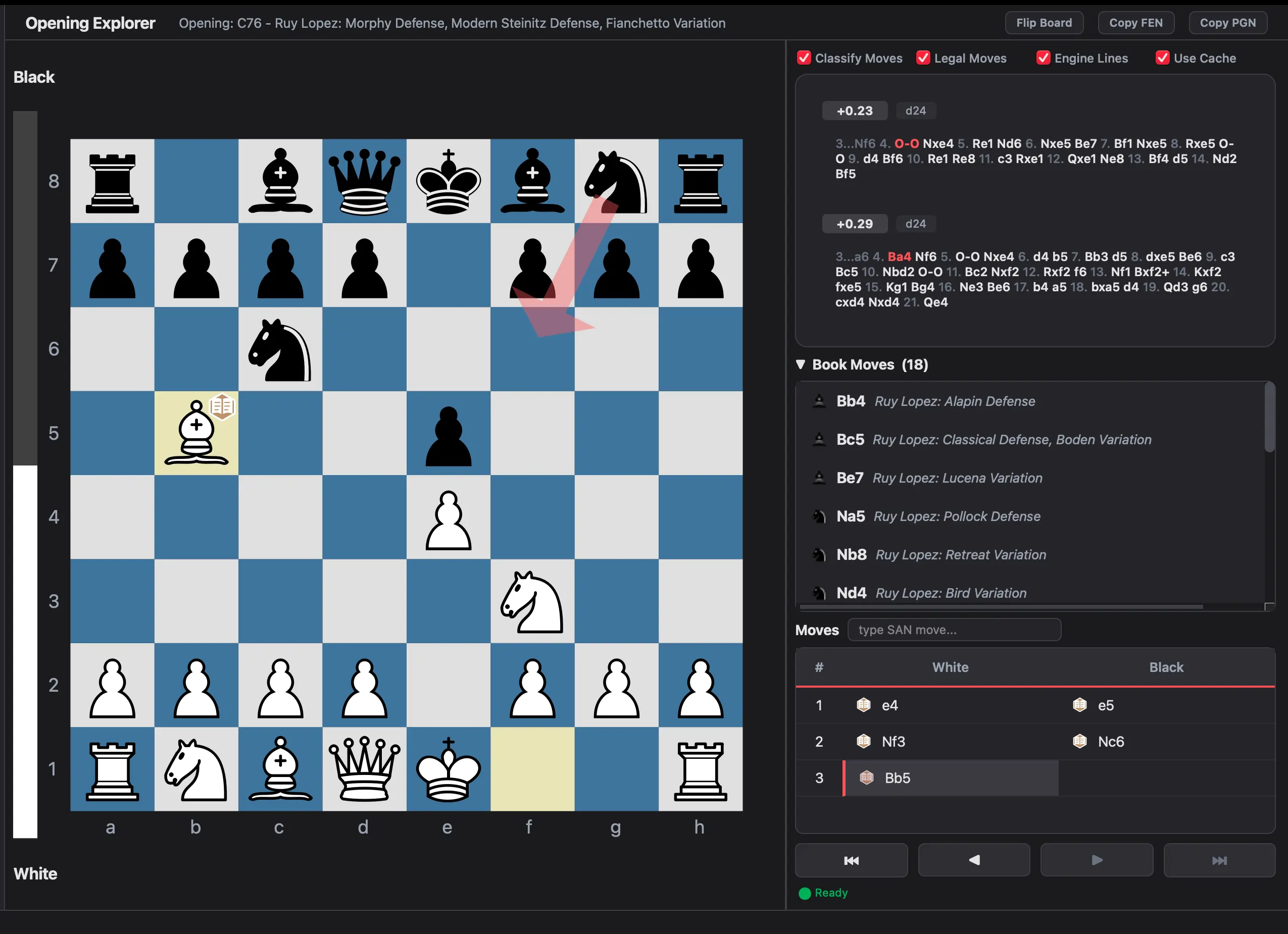 Chess Analyzer Pro Analysis View
Chess Analyzer Pro is the newest tool in this list. It is a desktop application built specifically for players who want unlimited local analysis without paying for subscriptions.
What it does best: Move classification. It labels every move from Brilliant to Blunder using a nine-tier system, similar to Chess.com's Game Review but running 100% locally. No other free GUI does this out of the box.
It also has:
- An accuracy scoring system using a volatility-weighted harmonic mean
- AI-powered game summaries (optional, requires a free Groq API key)
- A local SQLite database with search by player, opening, date, or ECO code
- Custom piece theme import (SVG)
- An interactive Analysis Explorer with independent board and Stockfish lines
- Polyglot opening book support (.bin files)
- Cross-platform auto-updates
Best for: Players who want a modern, polished experience with move classification and AI features, all running locally.
Arena
Arena is the veteran of free chess GUIs. It has been around since the early 2000s and is widely used by engine testers and serious analysts.
What it does best: Engine tournaments. Arena was built for running engine vs. engine matches. It supports multiple engines, tournament scheduling, and detailed game logging.
Limitations: Windows-only. The UI looks dated. No built-in move classification — you see raw evaluation scores. PGN management works but feels clunky by modern standards.
Best for: Running engine tournaments or if you need a battle-tested GUI for deep engine work on Windows.
Banksia GUI
Banksia GUI is a newer, cross-platform option written in Java. It is feature-rich and actively maintained.
What it does best: Analysis UI. Banksia has a clean board display, configurable engine lines, and good visualization of evaluation graphs. It supports opening books and tablebases.
Limitations: Requires Java runtime. The interface can feel complex with many panels and options. No AI coach features. Move analysis shows raw centipawn evaluation, not classified labels.
Best for: Players who want a modern cross-platform GUI with solid analysis tools and don't mind the Java dependency.
Scid vs PC
Scid vs PC is the database specialist. It started as a chess database tool and added engine analysis support.
What it does best: Game database management. You can search thousands of games by player, opening, position, ECO code, and more. It is the most powerful free chess database available.
Limitations: The engine analysis features work but are secondary to the database. The interface is dense and takes time to learn. No move classification beyond raw engine evaluation.
Best for: Players who maintain a large personal game database and want deep search capabilities alongside engine analysis.
Lichess Analysis Board
Lichess offers a free web-based analysis board that runs Stockfish in your browser via WebAssembly.
What it does best: Zero setup. Open a browser, paste a PGN, and you get instant analysis with an evaluation graph and engine lines.
Limitations: No true offline mode. Analysis speed depends on browser and hardware (WebAssembly is slower than native). No move classification system. No local database. Limited engine configuration.
Best for: Quick one-off analysis when you are already online and want something immediately.
Which One Should You Choose?
| If you want... | Choose... |
|---|---|
| Modern interface + move classification + AI | Chess Analyzer Pro |
| Engine tournaments | Arena |
| Cross-platform with rich analysis UI | Banksia GUI |
| Large game database management | Scid vs PC |
| Quick browser-based analysis | Lichess |
| Privacy + unlimited analysis | Chess Analyzer Pro or any local GUI |
| Offline use | Any desktop GUI |
The Bottom Line
All these tools are free. The best choice depends on what you value.
If you want a modern desktop experience with automatic move classification, AI summaries, and a local game database — all without subscriptions — Chess Analyzer Pro is built for that.
If you need engine tournaments, Arena is proven and reliable.
If you manage thousands of games and need powerful search, Scid vs PC is unmatched.
Try two or three. See which fits your workflow. They are all free, and they all give you unlimited, private chess analysis.
Links
- Download Chess Analyzer Pro: chessanalyzer.xyz/releases
- GitHub: github.com/imutkarsht/Chess_analyzer
- Arena: playwitharena.com
- Banksia GUI: banksiagui.com
- Scid vs PC: scidvspc.sourceforge.net
- Lichess: lichess.org
Try Chess Analyzer Pro
Analyze games with Stockfish offline, review blunders, and track your performance—100% free.
Written by
Utkarsh Tiwari
More from the blog
Chess Analyzer Pro v2.3.0: Complete Light Mode, Live Stockfish Analysis & Lichess Opening Explorer
Chess Analyzer Pro v2.3.0 is out. Featuring a full Light Mode with dynamic theming, real-time progressive Stockfish analysis, Lichess Opening Explorer integration, and redesigned game history.
Chess Analyzer Pro v2.2.0: Custom Themes, Setup Wizard & A Much Better First Day
v2.2.0 is out. This release focuses on the things that matter before you analyze your first game - getting the engine running, looking the way you want, and knowing where everything is.
Chess Analyzer Pro v2.1.0: Analysis Explorer, Polyglot Books, and Auto-Updates
The latest release of Chess Analyzer Pro adds an interactive opening explorer, support for Polyglot opening books, and cross-platform auto-updates. Here's what changed.