All articles Download
 App10 min6 min9 min
5 min read
Chess Analyzer Pro v2.6.0: Batch Analysis, Multi-Game Import & Shareable Reports
Chess Analyzer Pro v2.6.0 is out. Import a multi-game archive, queue a batch analysis, read confirmed tactics, choose a coach persona, share a report card, and export annotated PGN.
Chess Analyzer Pro
Free, offline Stockfish desktop analyzer. Local SQLite storage.
v2.6.0 is out.
The last few releases made the analysis deeper. This one makes it scale: bring in a whole archive, queue the games, and then read, share, and export the results without leaving the app.
Here is what changed.
Multi-game import#
Load Game still starts with one source: a PGN file, pasted text, Chess.com, or Lichess. The difference is what happens when the source contains more than one game.
Multi-game results now open the History import workspace instead of forcing you to load games one at a time. It is a virtualized table with:
- search across players, events, openings, and dates
- result, colour, speed, source, and saved-game filters
- optional board thumbnails
- ECO/opening, player Elo, move counts, and result
- per-game selection plus Add to history and Open game
Imported games land in History as unanalyzed, so the batch queue can pick them up. A single game still skips the workspace and loads straight into Analysis.
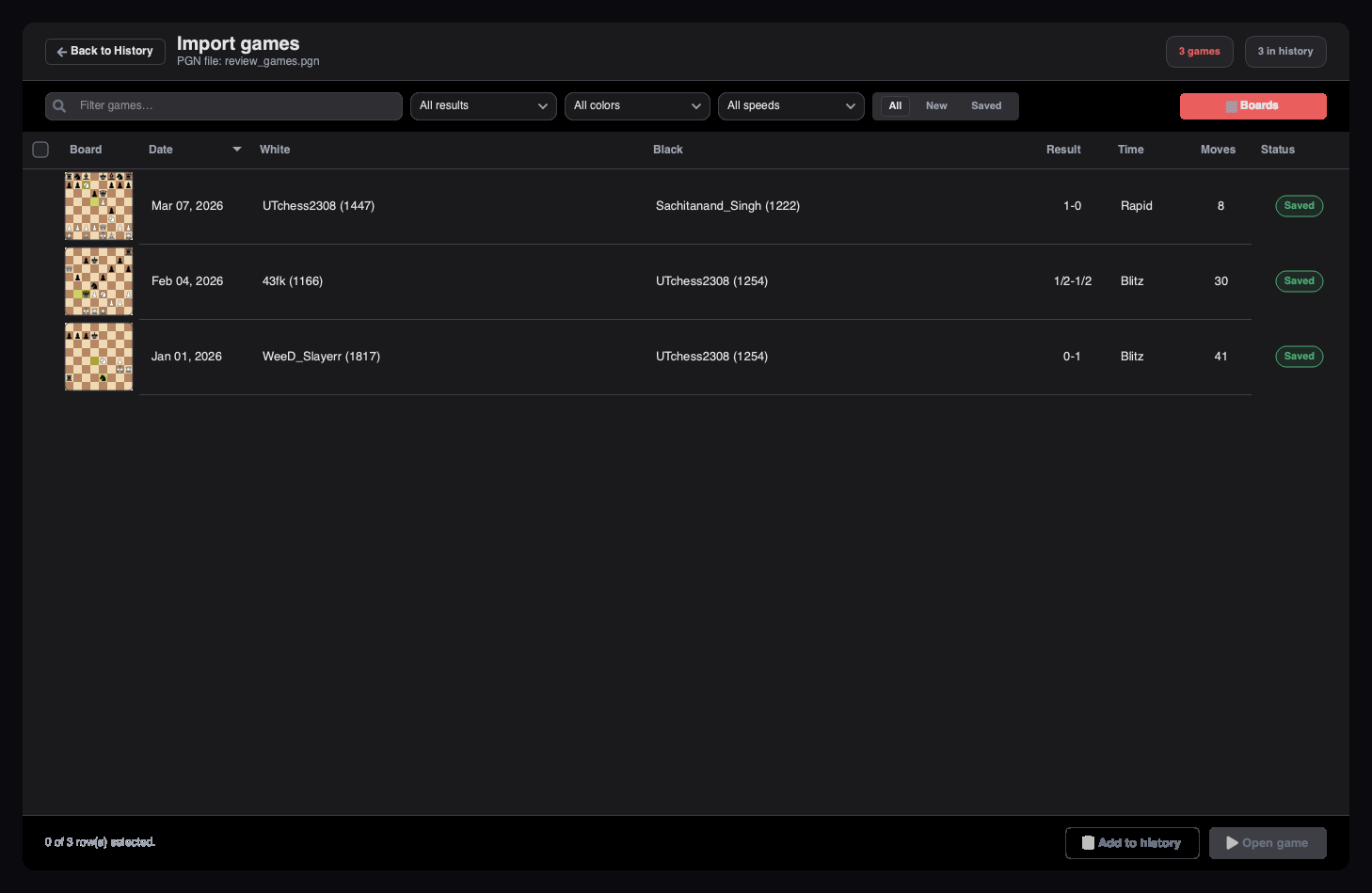 Multi-game import workspace with board thumbnails, filters, and Add to history / Open game actions
Batch analysis#
Analyzing a library one game at a time is tedious. History now has a Batch analysis queue.
Select only the unanalyzed and paused games you want, then start the queue. The card shows overall progress, the active game, move progress, elapsed time, ETA, finish time, and an Up next list. You can drag rows to reorder, remove a game, pause, resume, or cancel.
The queue is persisted, so pausing or closing the app does not throw away the plan. Single-game and live-engine analysis are gated while a batch runs, and imports never start analysis automatically.
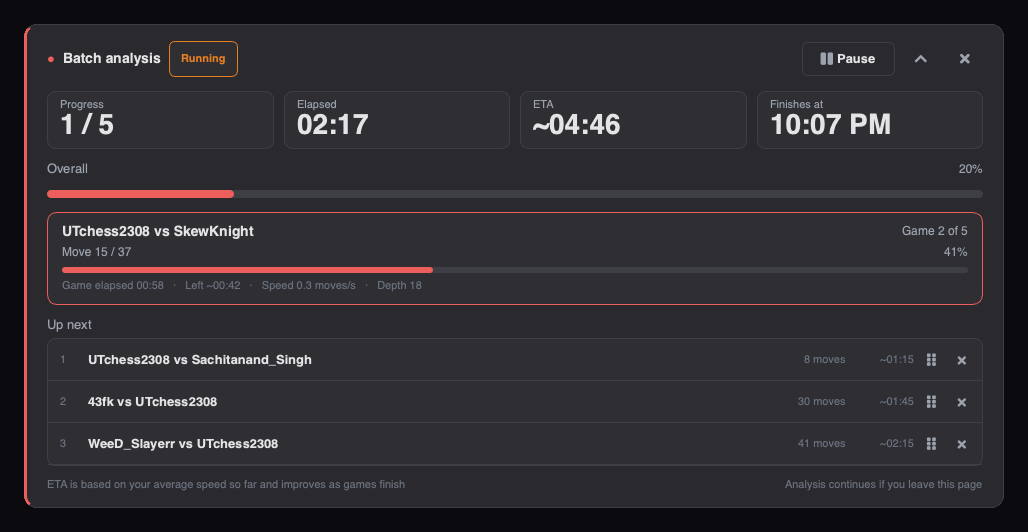 Batch analysis queue with progress, current game, ETA, and Up next
A better Coach#
The Coach still works from deterministic facts, but the facts are sharper and the voice is now yours to choose.
Four personas#
Pick a persona in Settings → AI Coach:
- The Tactician — patient beginner-to-intermediate coaching
- The Grandmaster — concise, advanced positional assessment
- The Socratic Mentor — one guiding question, then the answer
- The Roaster — one joke, then real coaching
Each persona has a distinct note shape and its own explanation-cache namespace. Switching voices does not reuse a reply written for a different one.
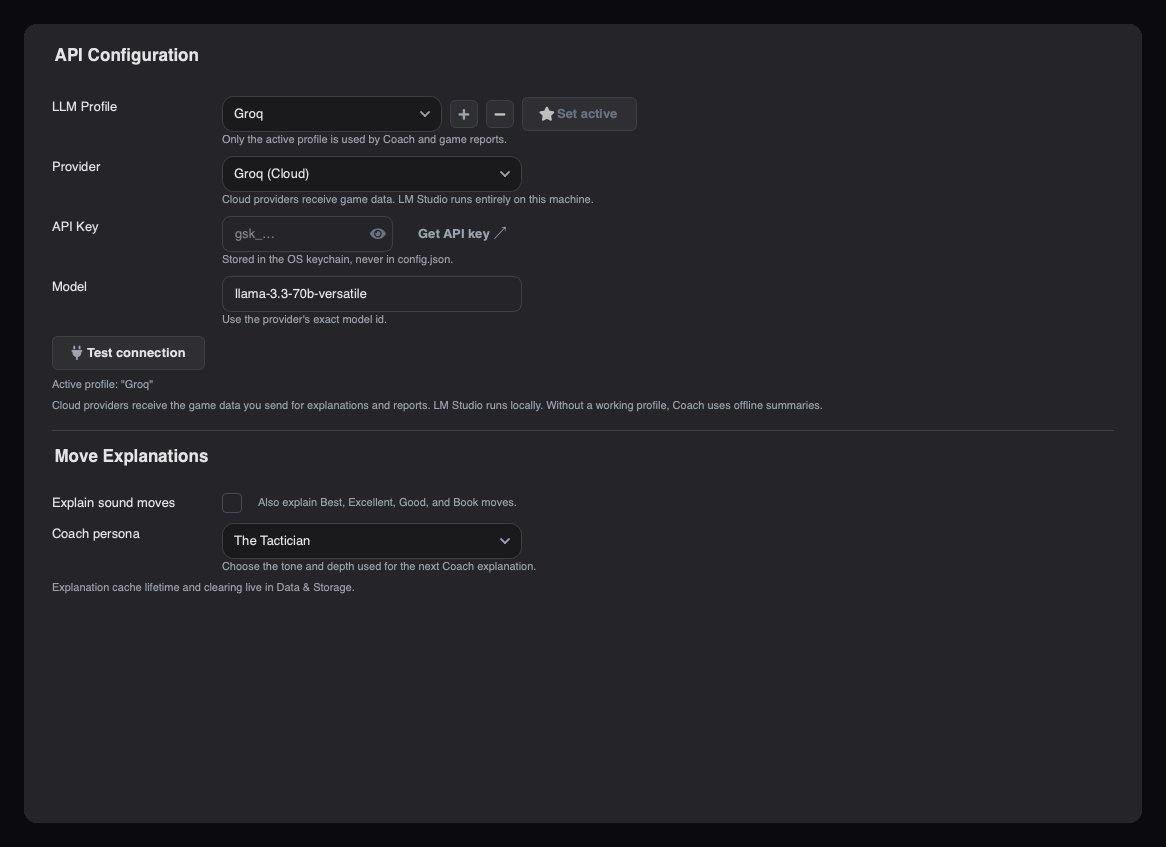 AI Coach settings with the Coach persona selector
Concrete explanations#
The claim sheet now includes played motifs, newly hanging pieces, created threats, numbered main and punishment lines, line captures, and second-best comparisons. Deliberate sacrifices are described as sacrifices, not loose pieces.
The card renders Why it works / The idea / Remember for sound moves, and What went wrong / The punishment / Better / Pattern for mistakes. The same claims power the offline fallback, so the Coach still works with no provider. LLM replies are rewritten as natural prose and must name the better move when one exists.
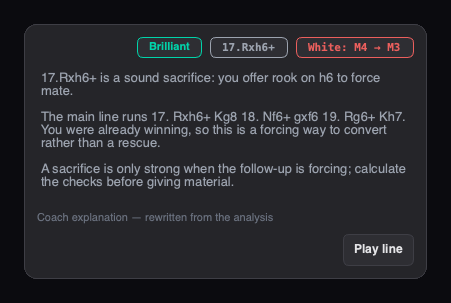 Coach card with a grounded move explanation and the Play line action
Motifs you can trust#
The Tactics tab is now a per-game timeline for both colours: Executed Tactics, Tactics Allowed, Tactics Missed, Pieces Lost, and Pieces Won. Rows group multiple pieces on the same move, show the chess evidence, and jump to the exact board position.
More importantly, the pipeline is stricter. Tactics must survive:
- Legal-capture SEE — the exchange is evaluated on the real board, including every legal recapture.
- One-reply-ahead loss attribution — the loss must still exist after the opponent's best reply.
- Engine/game confirmation — the result must match the analysed game.
Missed tactics are suppressed on best and mating moves. Sacrifices require the engine-approved move and report net material. Pins need a tactical consequence, skewers need an interposed-free vacate-then-capture line, and Morphy/Boden mates need real mating geometry. Only confirmed facts enter the headline stats.
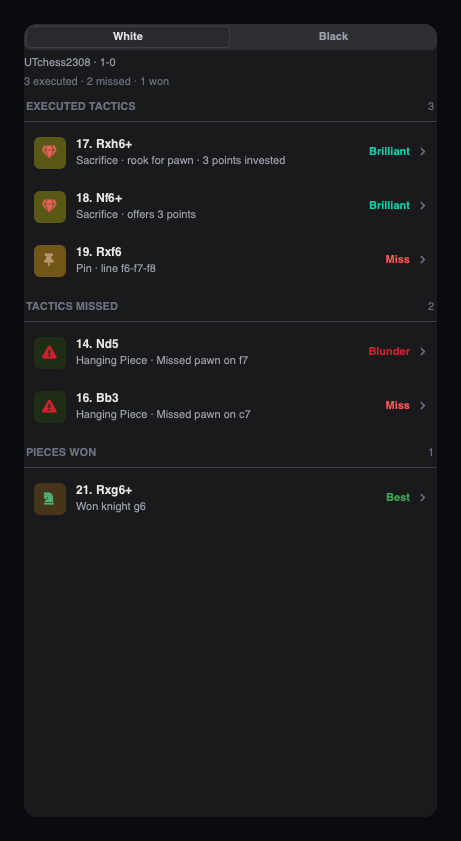 Tactics tab with executed, allowed, and missed tactics plus pieces won
Share the game#
The Report tab can now render a 1200×675 report card from a completed analysis. Preview it, copy the image to the clipboard, save it as a PNG, or copy a Markdown summary.
The card includes the final board, result and termination, standard time-control notation, accuracy, and the app version. Export stays disabled until the game actually has analysis.
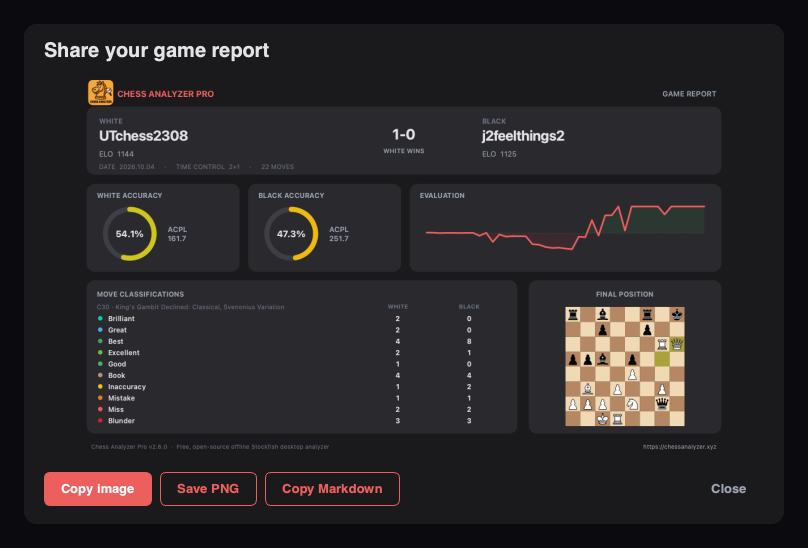 Share Game Report dialog with the rendered 1200×675 report card, Copy image, Save PNG, and Copy Markdown actions
Annotated PGN export#
Export one analyzed game from Analysis or filtered History as standards-compatible PGN with:
- move-quality NAGs
- White-perspective evaluations
- depth and clock tags
- up to two legal 12-ply engine variations
History exports stream in the background with progress and cancellation, preserve unanalyzed PGN text, and skip or report invalid games. The result opens cleanly in other chess tools.
Smaller improvements#
- History command bar — search, Filters, and Sort stay visible; active filters become removable tokens, and every filter runs in SQL so counts and paging stay correct.
- Playback controls — an inline play/pause button, a follow toggle, and vertical wheel or trackpad stepping on the Analysis board.
- Performance — analysis callbacks are coalesced into a 100 ms UI flush, Matplotlib cards build lazily, and History rows are batched.
- Vector branding — the in-app logo now uses SVG across the window icon, splash, welcome/About, setup wizard, and report card.
Fixes worth mentioning#
- Large multi-game PGN files no longer freeze the UI. The picker indexes headers only, parses on demand, and runs file/drop indexing off the GUI thread.
- Tactical drill-down opens the exact displayed move and renders mate evaluations as
+M3/-M4. - Cached Coach explanations are restored when you return to a move, without another request.
- Time-control notation is parsed in one place, so report cards and share output agree.
Licensing#
From 2.6.0, Chess Analyzer Pro is released under GPL-3.0-only. Releases up to and including 2.5.0
remain MIT. The repository now includes THIRD-PARTY-NOTICES.md, and packaged builds ship the
licence text for every bundled package.
The accuracy and win-probability math was also rewritten as an original implementation to keep the GPL-3.0-only relicensing clean. Behaviour is unchanged, so stored analyses remain valid.
Upgrading#
If you already have Chess Analyzer Pro installed, the auto-updater will prompt you on startup. You can also download the latest build from the releases page.
Existing games, analyses, settings, and coach explanations stay in your local database. No account or migration step is required.
Try Chess Analyzer Pro
Analyze games with Stockfish offline, review blunder classifications, and manage your local game archive.
Author
Utkarsh Tiwari
More from the blog
Chess Analyzer Pro v2.5.0: AI Coach, Playable Variations & a Rebuilt Settings Page
Chess Analyzer Pro v2.5.0 is out. Featuring grounded AI Coach explanations, playable variation branches, a rebuilt settings page, more configuration options, a full interface pass, and a faster history view.
Chess Analyzer Pro v2.4.0: Performance Analytics, Drill-Down Stats & an Interactive Landing Hub
Chess Analyzer Pro v2.4.0 is out. Featuring a redesigned Performance Analytics dashboard, interactive drill-down stats, pause & resume analysis, 1,000+ game database scalability, and a new landing hub with 25 famous historic games.
Chess Analyzer Pro v2.3.0: Complete Light Mode, Live Stockfish Analysis & Lichess Opening Explorer
Chess Analyzer Pro v2.3.0 is out. Featuring a full Light Mode with dynamic theming, real-time progressive Stockfish analysis, Lichess Opening Explorer integration, and redesigned game history.