Chess AnalyzerPro
FeaturesReleasesReviewsDocsBlog
Download
Chess Analyzer Pro Logo
Chess AnalyzerPro

Free, open-source offline Stockfish desktop analyzer. Local SQLite storage, opening explorer, and move classifications.

Product

  • About Project
  • Download Releases
  • Features
  • Documentation
  • Analysis Blog

Open Source

  • GitHub Repository
  • Credits & Attributions
  • Community Reviews
  • Submit Feedback

Author

  • Utkarsh Tiwari (@imutkarsht)
  • Portfolio
  • LinkedIn
  • Contact
Released under the GPL-3.0 License. Stockfish is licensed under GPLv3.
All articles
October 20, 20266 min read

Chess Analyzer Pro v2.4.0: Performance Analytics, Drill-Down Stats & an Interactive Landing Hub

Chess Analyzer Pro v2.4.0 is out. Featuring a redesigned Performance Analytics dashboard, interactive drill-down stats, pause & resume analysis, 1,000+ game database scalability, and a new landing hub with 25 famous historic games.

Chess Analyzer Pro Logo

Chess Analyzer Pro

Free, offline Stockfish desktop analyzer. Local SQLite storage.

Download

v2.4.0 is here, and it's a big one.

After v2.3.0, I said I wanted to ship updates more consistently. This release is the first proof of that. The theme of v2.4.0 is understanding your play: not just seeing which moves were mistakes, but seeing patterns in how you play, and jumping straight to the positions that matter.

Here's everything new.


Performance Analytics Dashboard, Completely Rebuilt#

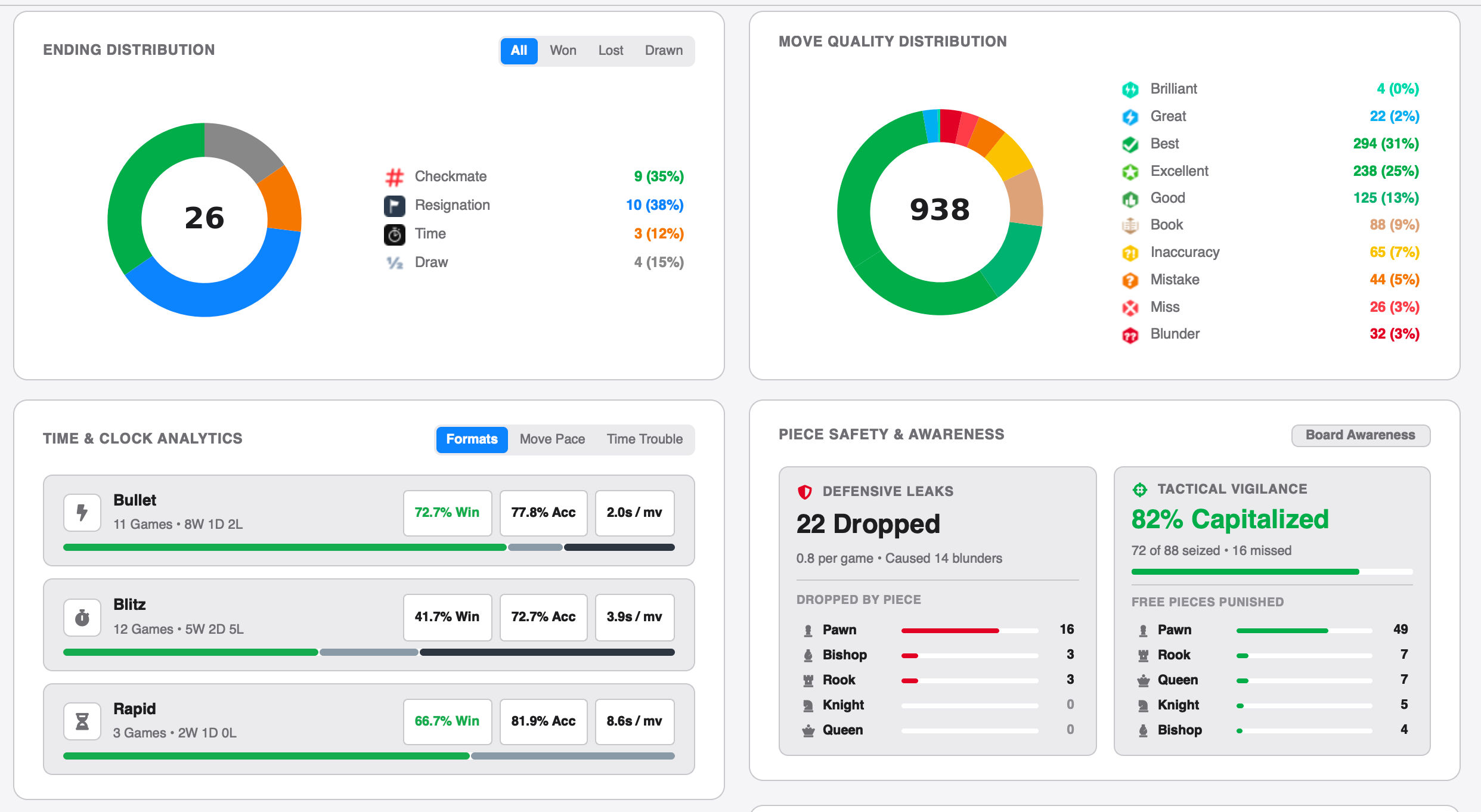
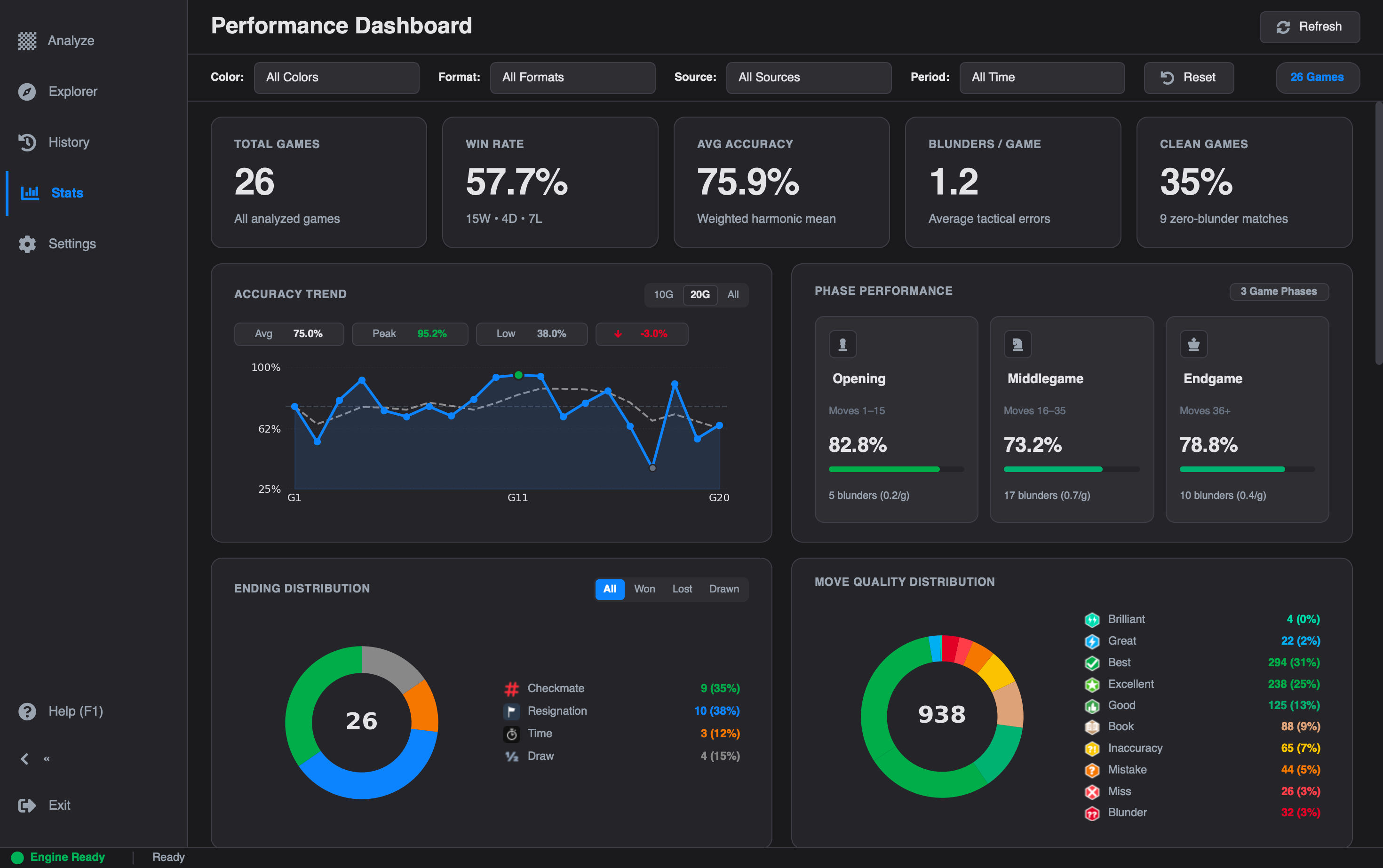
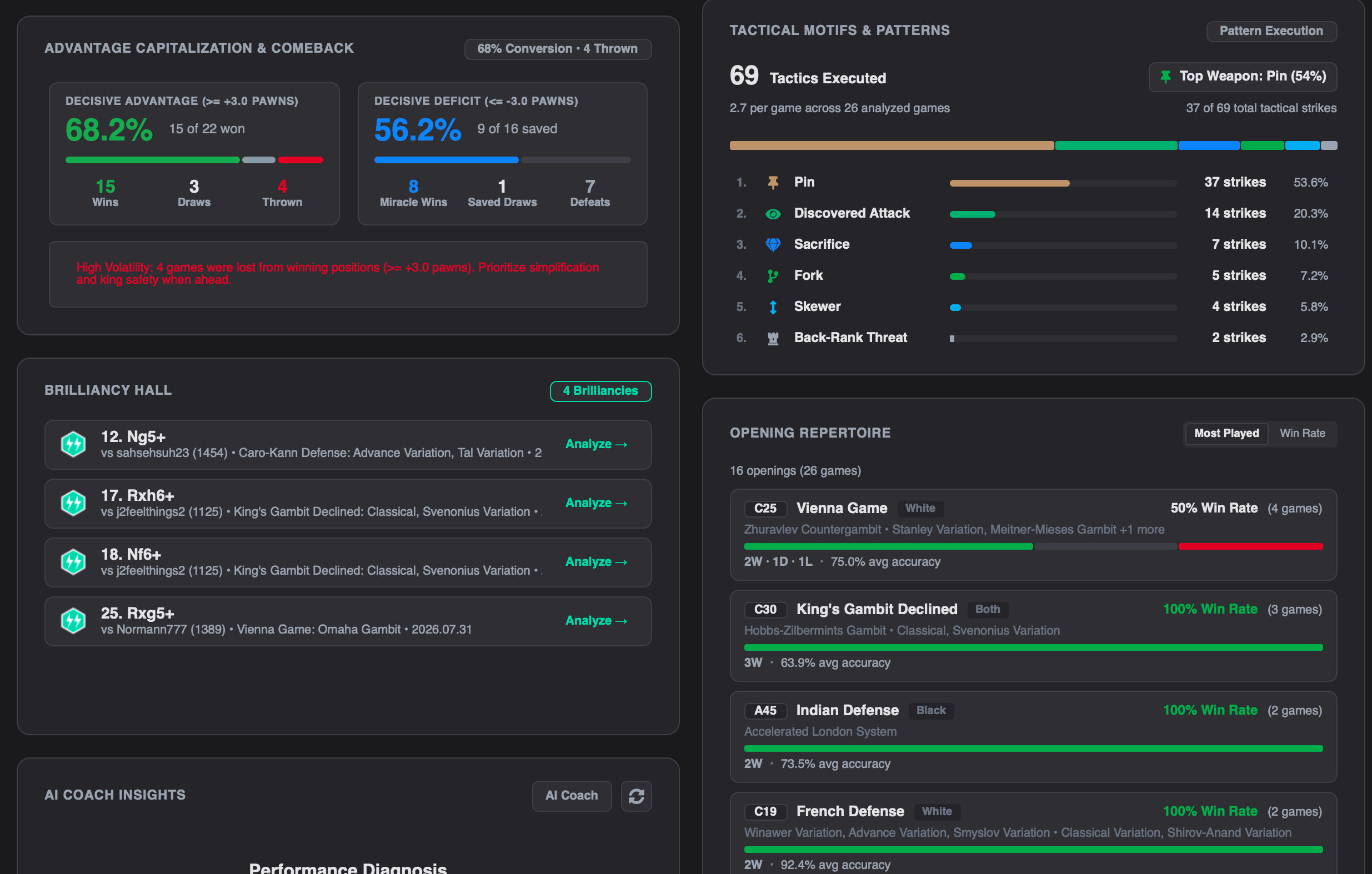
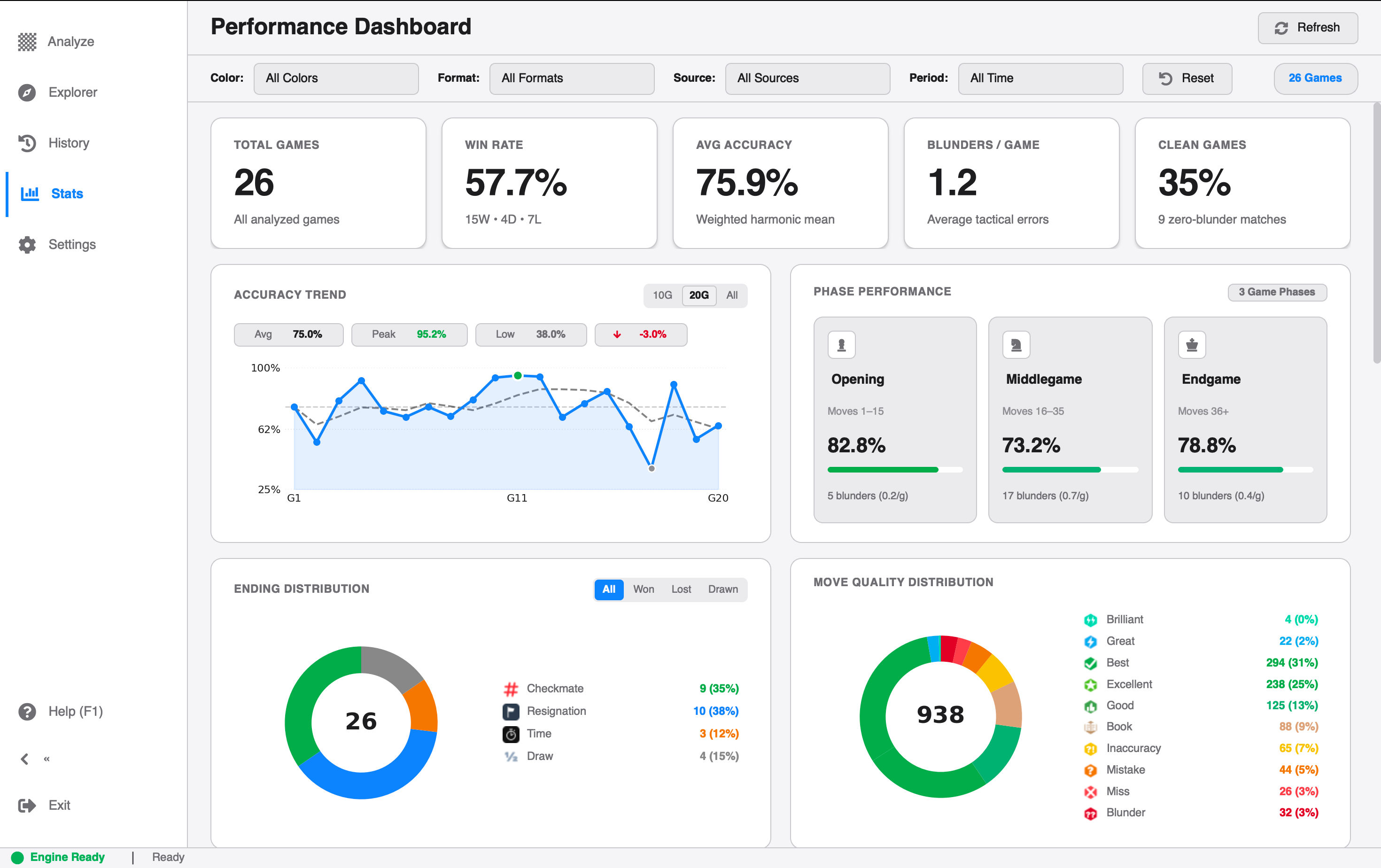
The Metrics page used to give you a handful of numbers. In v2.4.0, it has been redesigned from the ground up to collect and present in-depth statistics across all your analyzed games.

Performance Analytics DashboardPerformance Analytics Dashboard
Performance Analytics Dashboard

What you can see now:#

  • Phase Accuracies: Separate accuracy scores for the opening, middlegame, and endgame, so you can tell where your games are won or lost instead of guessing.
  • Advantage Conversion: How often you turn a winning position into an actual win, and how often you let it slip.
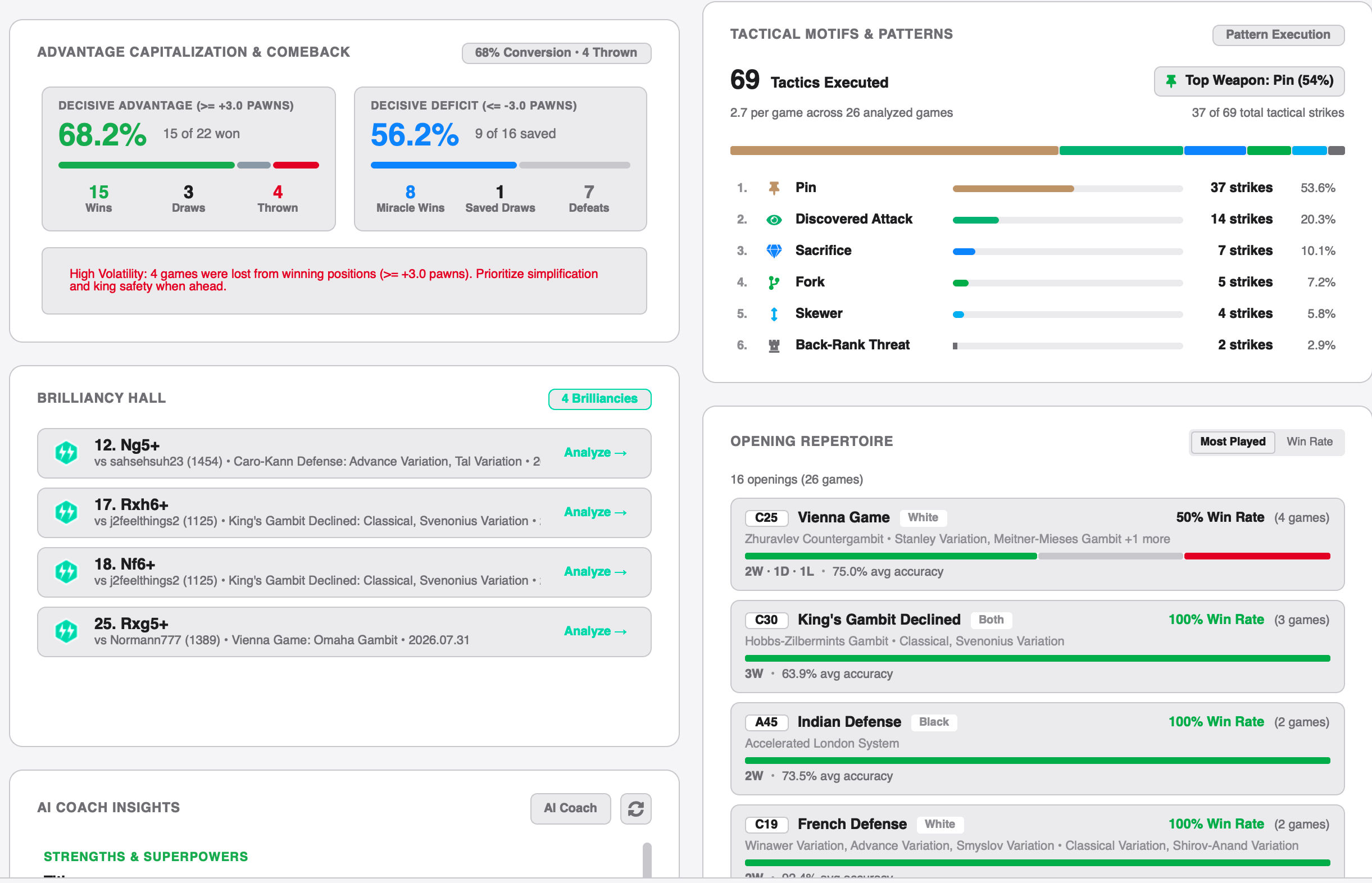
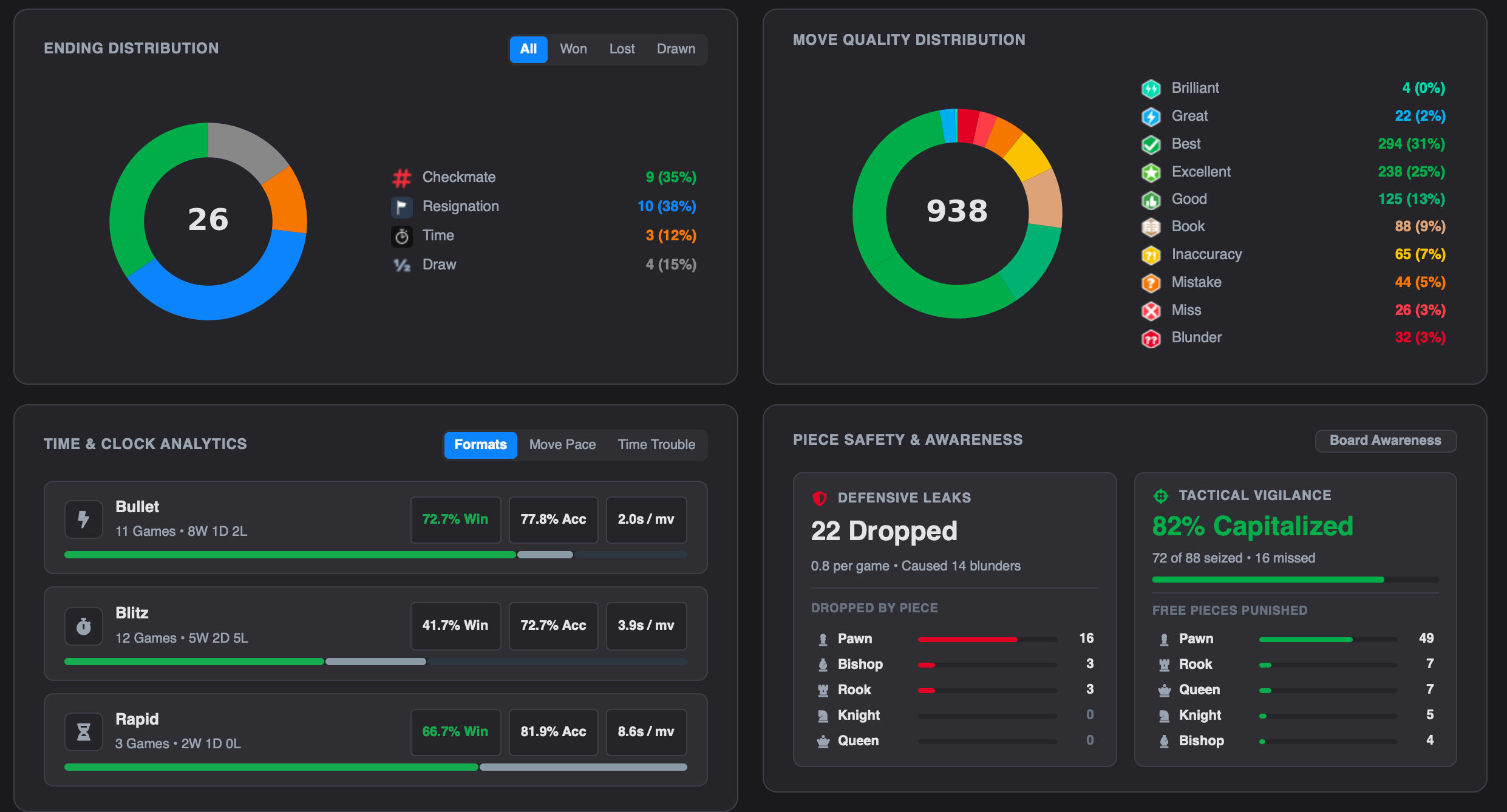
  • Tactical Motifs: A breakdown of the tactics you find (and miss) across your games.
  • Move Quality Totals: Brilliancies, blunders, and misses aggregated over your whole library.
Tactical Motifs, Blunders & Move BreakdownTactical Motifs, Blunders & Move Breakdown
Tactical Motifs, Blunders & Move Breakdown
Opening & Phase Accuracy BreakdownOpening & Phase Accuracy Breakdown
Opening & Phase Accuracy Breakdown

If you've been wondering whether your problem is opening prep, middlegame tactics, or converting endgames, the dashboard now answers that directly.


Interactive Stats Drill-Down Explorer#

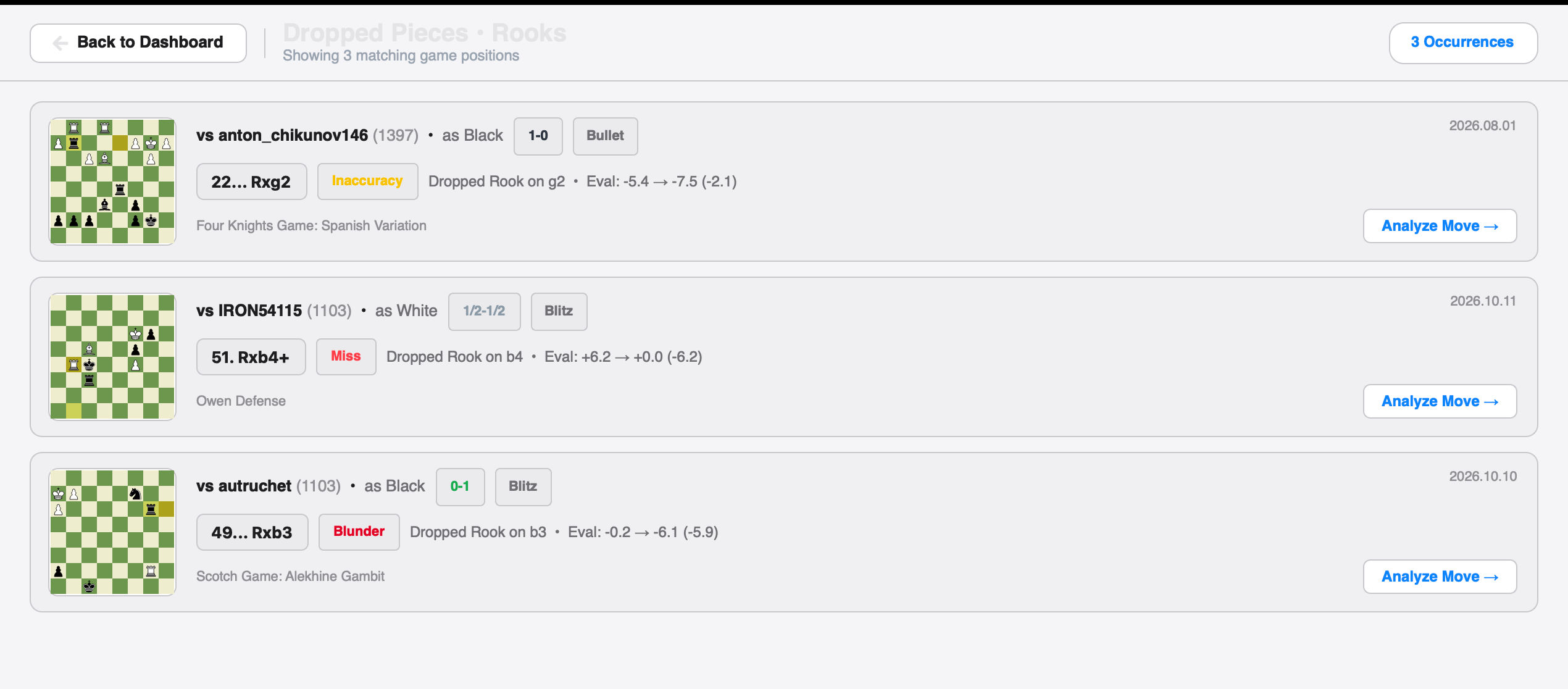
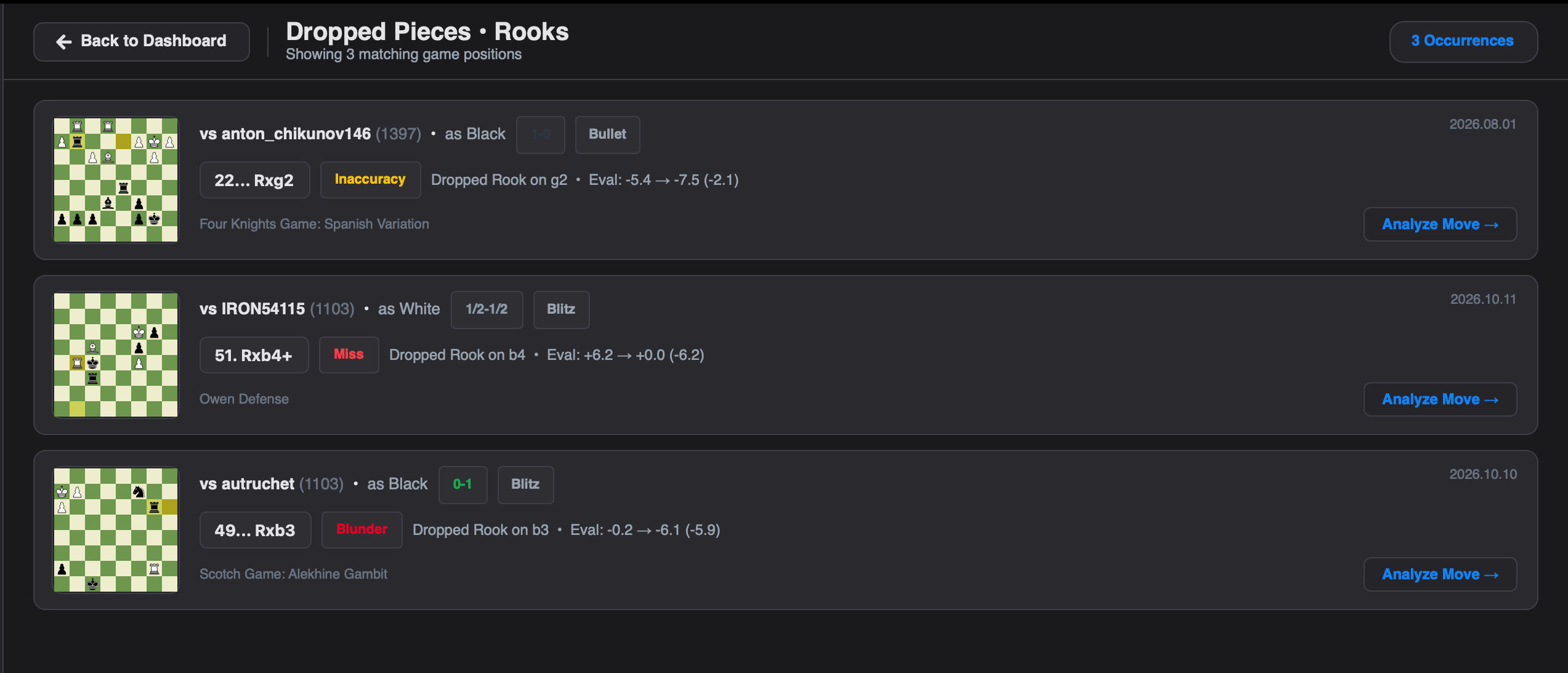
Numbers are useful, but chess is about positions. So every stat is now clickable.

Interactive Stats Drill-Down Explorer showing exact blunder positionInteractive Stats Drill-Down Explorer showing exact blunder position
Interactive Stats Drill-Down Explorer showing exact blunder position

Click any metric category and an interactive board modal opens, jumping directly to the exact position behind that number:

  • Brilliancies: Revisit your best moments.
  • Blunders: Find the exact moments that cost you games.
  • Misses: See the opportunities you overlooked.
  • Tactics: Review the motifs you found or missed.
  • Phases: Inspect positions from your weakest phase of the game.
  • Openings: Check where your repertoire is leaking points.

Instead of "I blunder too much," you get "here are my blunders," each one a click away. It turns statistics into a practical training list.


Pause & Resume Game Analysis#

Long analyses used to be all-or-nothing. In v2.4.0 you can pause a running analysis and resume it later, picking up from the first unanalyzed move without losing any progress.

Paused Game Analysis StatePaused Game Analysis State
Paused Game Analysis State

This pairs with a new staging system: imported games are immediately saved to the database with a status of completed, paused, or not_started. Load a game, close the app, and come back later. Nothing is lost, and you can always see what still needs analysis.


Smarter Brilliancy & Move Classification#

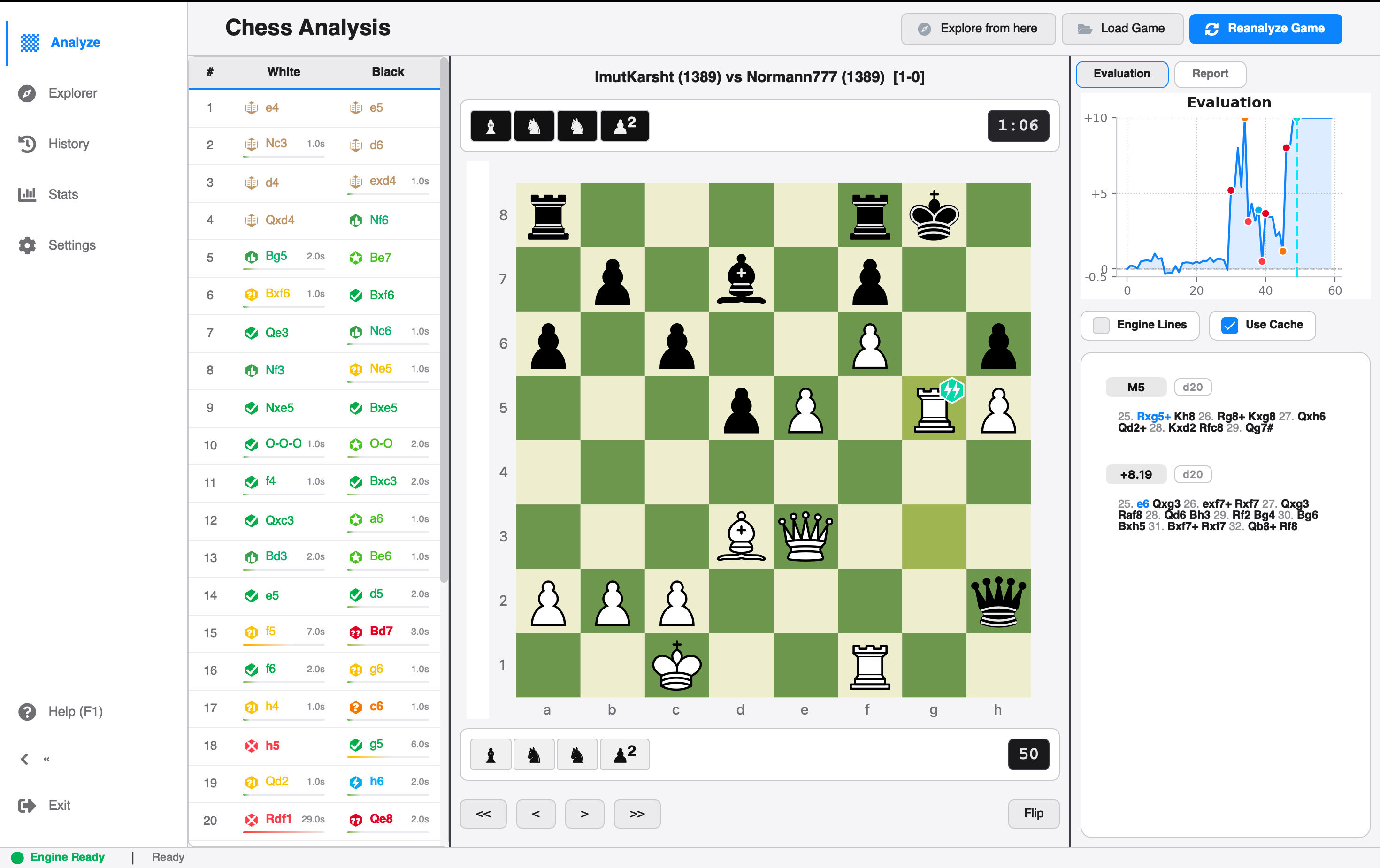
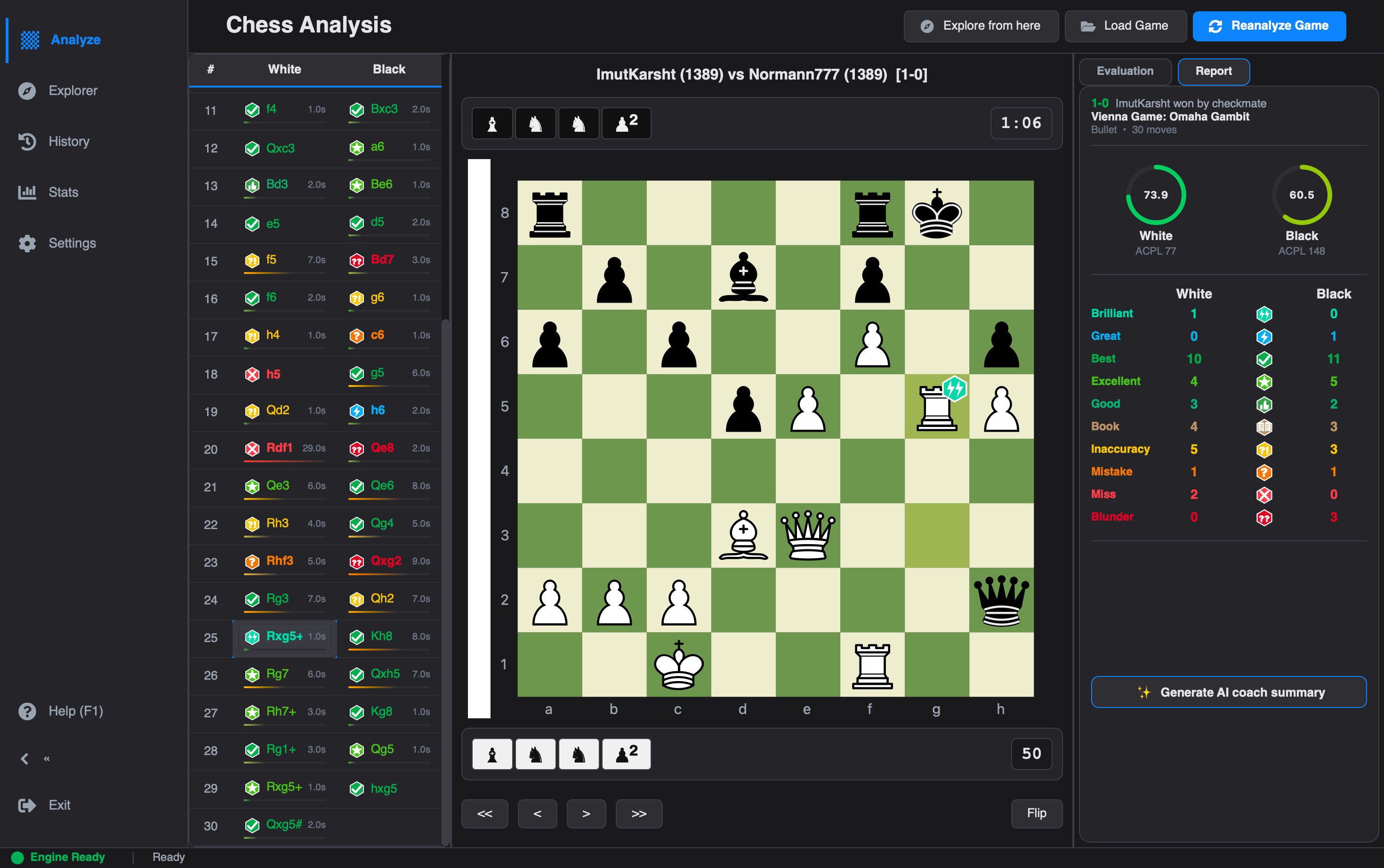
Move classification got a significant accuracy upgrade:

  • Piece Sacrifice Detection Engine: Brilliancies are now backed by actual sacrifice detection, so the badge is reserved for genuine, sound sacrifices rather than any strong move.
  • Calibrated Blunder & Miss Thresholds: Tuned so that classifications better match how strong players judge a move.
  • Strict 10.0% Accuracy Floor: Accuracy now uses volatility-weighted harmonic scoring with a strict per-move floor, so a single blunder can't collapse your whole game's accuracy score.
  • Fewer False Tactical Alerts: Fixed inverted bitboard ray stepping and added Static Exchange Evaluation (SEE minimax), eliminating false "hanging piece" warnings.
Stockfish Analysis with Calibrated Move Classification & Evaluation BarStockfish Analysis with Calibrated Move Classification & Evaluation Bar
Stockfish Analysis with Calibrated Move Classification & Evaluation Bar

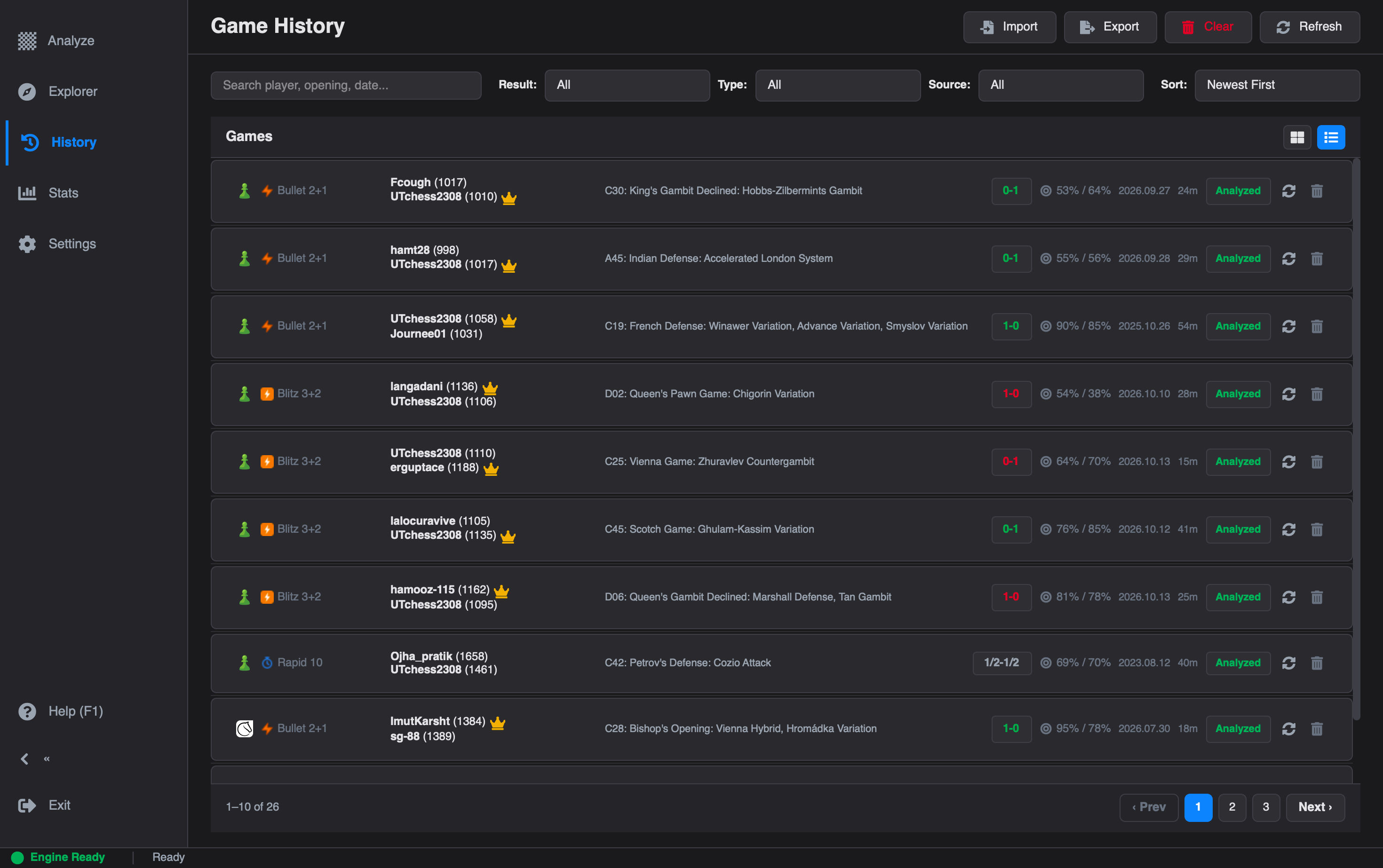
Built for 1,000+ Games#

If you have a large game library, v2.4.0 keeps things fast:

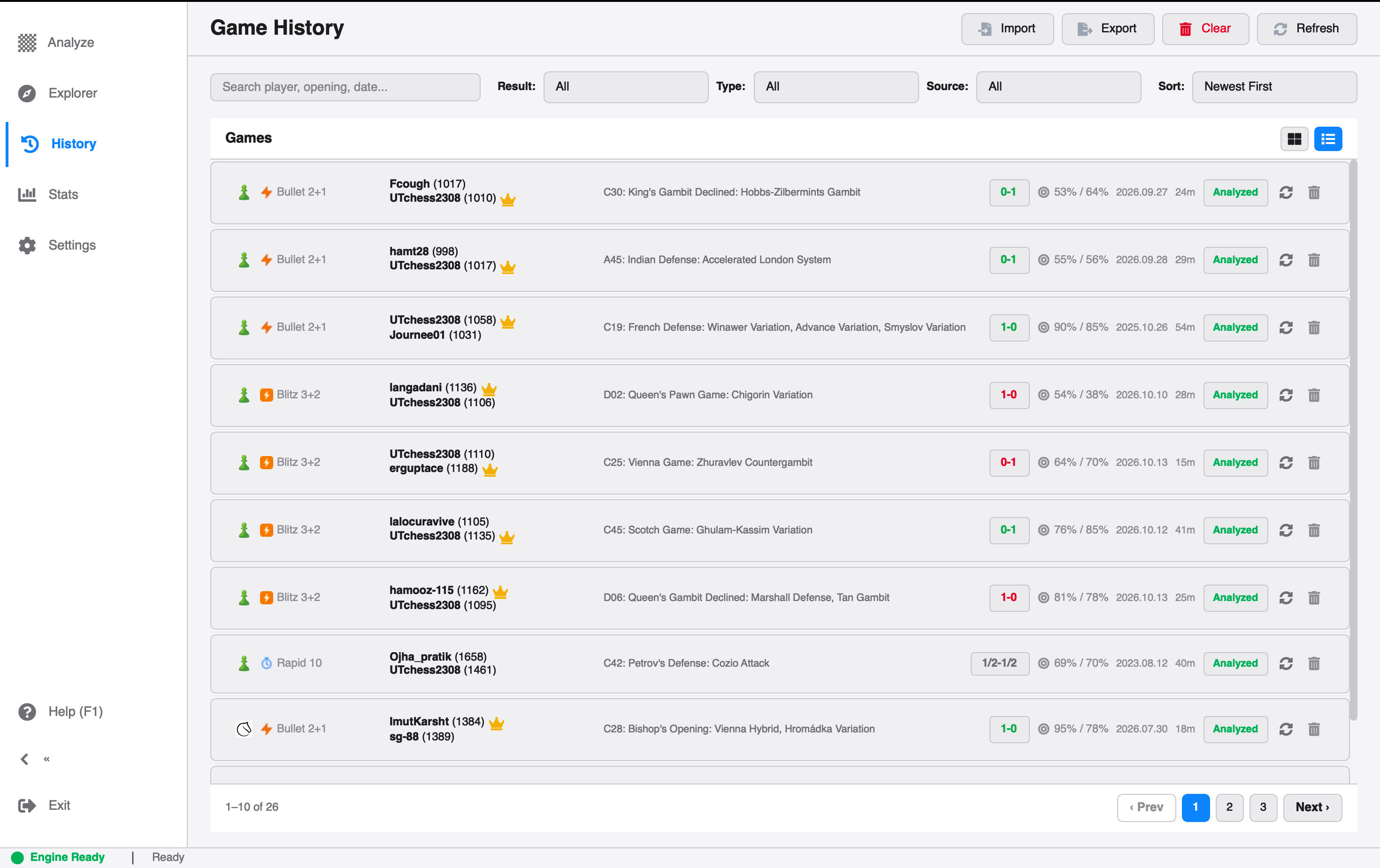
  • SQLite WAL Mode for smoother reads and writes.
  • Composite B-Tree Indexes for quicker lookups and filtering.
  • Automated Compaction (VACUUM) to keep the database lean over time.
  • Uncapped Batch Import/Export for large game collections.
  • Resource Leak Fixes: SQLite wrappers now have explicit context management and teardown hooks, so no connections are left open on shutdown.
  • CSV Import Crash Fixed: The CSV field size limit is raised to 2GB, so large analysis move payloads no longer crash imports.
Scalable SQLite Game History Archive in Dark and Light ModeScalable SQLite Game History Archive in Dark and Light Mode
Scalable SQLite Game History Archive in Dark and Light Mode

A New Interactive Landing Workspace#

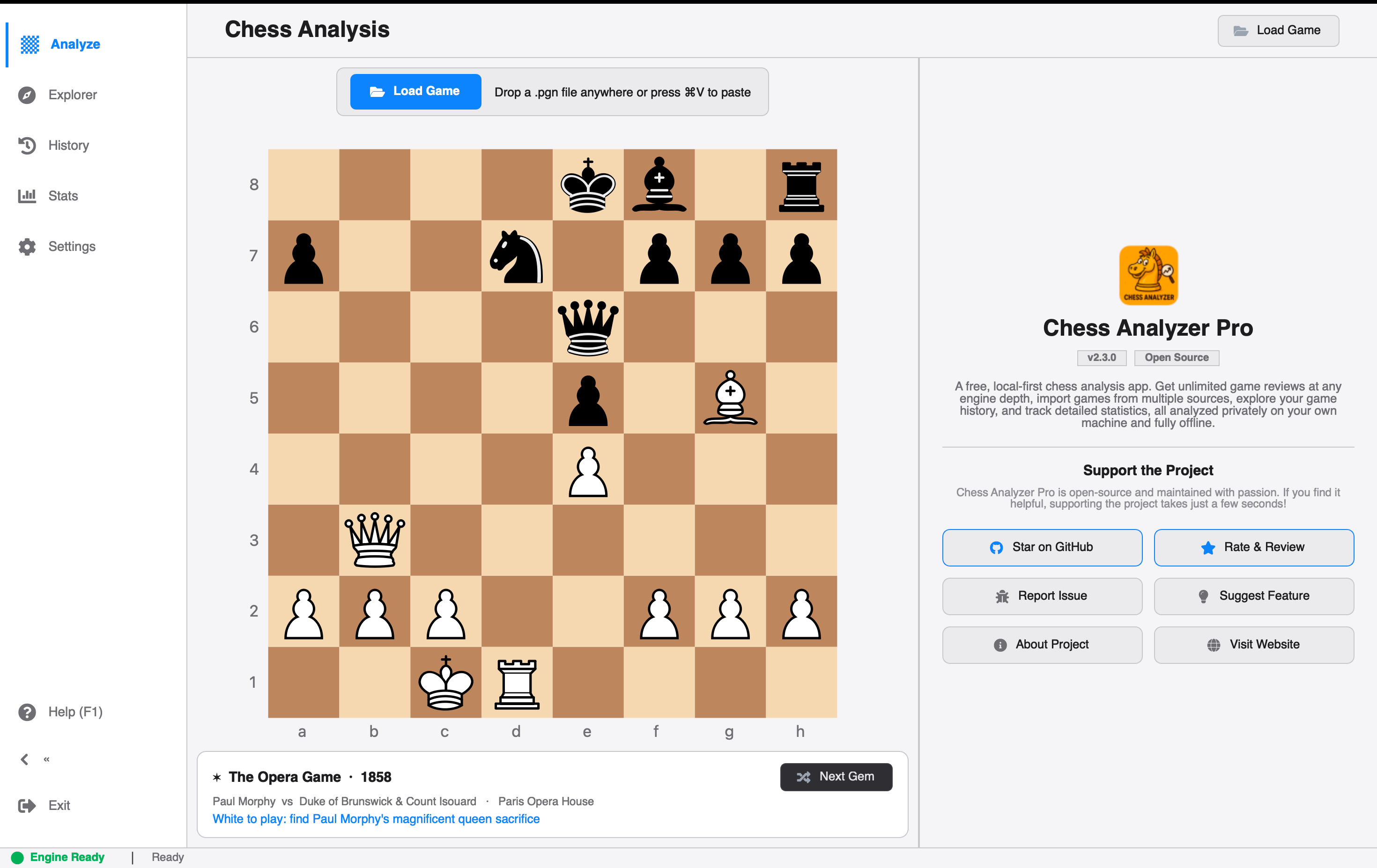
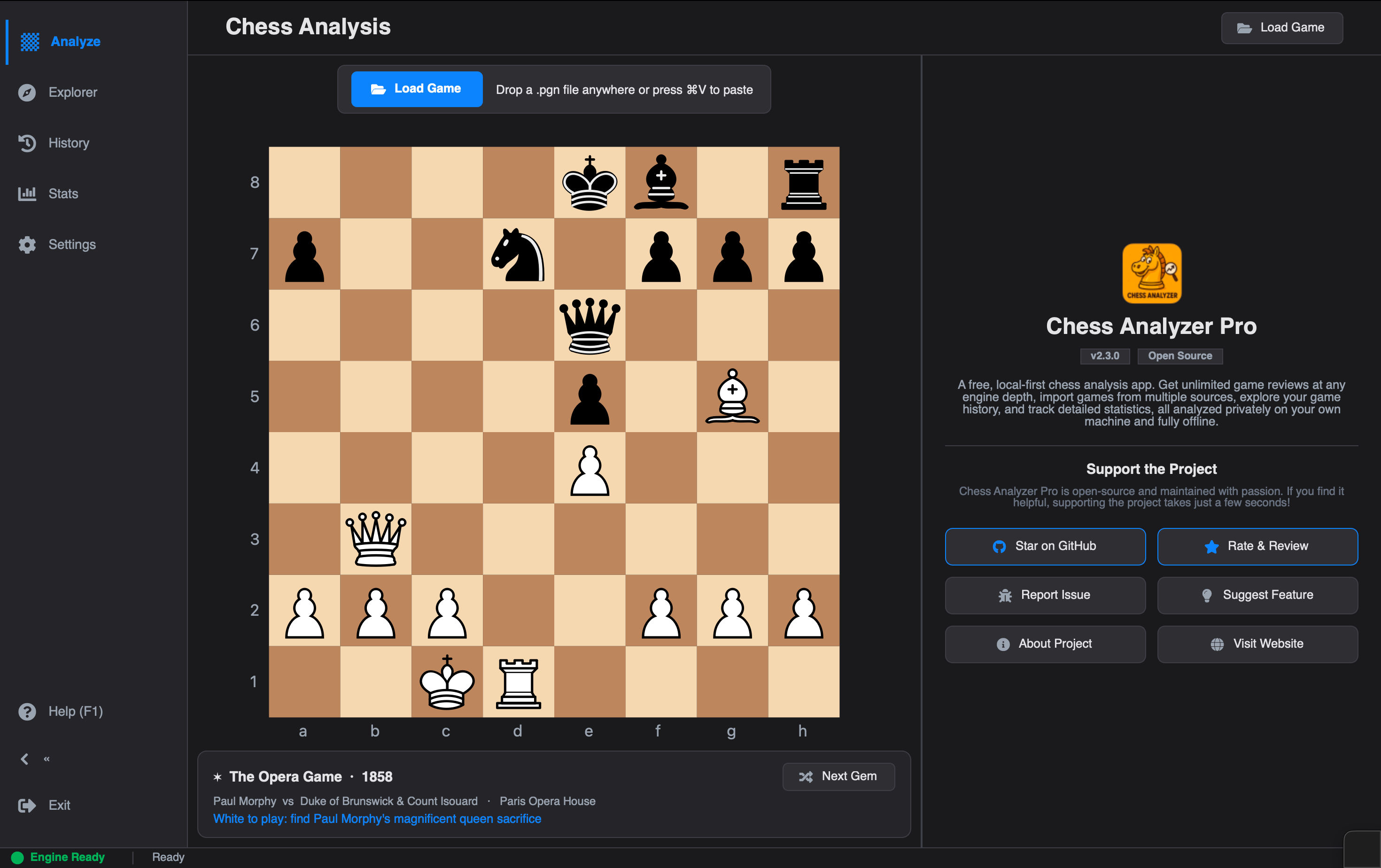
Launching the app with no game loaded used to mean an empty screen. Now you get a 60-40 split hero hub:

Interactive Landing Hub & Welcome WorkspaceInteractive Landing Hub & Welcome Workspace
Interactive Landing Hub & Welcome Workspace
  • Left (60%): A fully playable interactive board.
  • Right (40%): A dedicated Welcome & Community Hub (WelcomePanel).

Famous Historic Games Discovery#

The landing board loads a random legendary position from a built-in collection of 25 iconic games from chess history. Each comes with interactive move celebration and a historical backstory, so every launch teaches you something.

The guided tour overlay was also rebuilt to highlight the new landing layout and its sub-panels.


Bug Fixes#

  • Live Analysis Clock Sync: Dynamic clock times and captured pieces now update correctly during progressive move-by-move streaming.
  • Board Theme Crash: Resolved a KeyError: 'default' by correctly mapping configured board themes through Styles.get_board_colors().
  • Tactical False Positives: Fixed as described above.
  • Database Leaks & CSV Crash: Fixed as described above.

Under the Hood#

Not flashy, but important for the project's future:

  • Modular MainWindow: The monolithic 2,000-line MainWindow is now split into focused mixins: NavigationMixin, AnalysisMixin, GameLoadingMixin, StatusBarMixin, ThemeMixin, TourMixin, and UpdateMixin.
  • Storage Repositories: GameHistoryManager is decomposed into single-responsibility repositories for games, API cache, explorer cache, and database connection.
  • Hardened Logging: Centralized logging with debug and info levels, rotating file handlers, and automatic redaction of sensitive API tokens.
  • Open Source Standards: Added a Code of Conduct, Security Policy, Ruff linter configuration with CI workflow, and standardized architecture guidelines.
  • Better Tests: Pruned redundant assertions, consolidated GUI fixtures, and expanded unit test coverage across backend and UI modules.

These changes make the codebase easier to maintain and much friendlier for contributors.


What's Next#

  • Improved AI Move Explanations: Clearer reasoning on why a move was a mistake.
  • Game Exports: More ways to export and share analyzed games.
  • Deeper Stats: Building on the new dashboard with long-term trends.

Have ideas? Use the in-app feedback dialog or leave a review on the website.


Upgrading#

If you already have Chess Analyzer Pro installed, the auto-updater will prompt you on startup.

For fresh downloads or manual updates:

  • Windows: .exe installer (includes auto-updater and desktop shortcuts)
  • macOS: .dmg (Universal binary for Apple Silicon & Intel)
  • Linux: .AppImage (self-contained, works across major distros)

Links & Community#

  • Download v2.4.0: chessanalyzer.xyz/releases
  • GitHub Repository: github.com/imutkarsht/Chess_analyzer
  • Full Release Notes: chessanalyzer.xyz/docs/patch-notes
  • Leave a Review: chessanalyzer.xyz/reviews

If you find Chess Analyzer Pro useful, please star the project on GitHub. It helps more chess players discover a free, open-source alternative to paid subscriptions!

If you find Chess Analyzer Pro useful, please star the project on GitHub. It helps more chess players discover a free, open-source alternative to paid subscriptions!

Try Chess Analyzer Pro

Analyze games with Stockfish offline, review blunder classifications, and manage your local game archive.
Download App
Author

Utkarsh Tiwari

PreviousChess Analyzer Pro v2.3.0: Complete Light Mode, Live Stockfish Analysis & Lichess Opening ExplorerNext Chess Analyzer Pro v2.5.0: AI Coach, Playable Variations & a Rebuilt Settings Page

More from the blog

Chess Analyzer Pro v2.5.0: AI Coach, Playable Variations & a Rebuilt Settings Page

Chess Analyzer Pro v2.5.0 is out. Featuring grounded AI Coach explanations, playable variation branches, a rebuilt settings page, more configuration options, a full interface pass, and a faster history view.

10 min

Chess Analyzer Pro v2.3.0: Complete Light Mode, Live Stockfish Analysis & Lichess Opening Explorer

Chess Analyzer Pro v2.3.0 is out. Featuring a full Light Mode with dynamic theming, real-time progressive Stockfish analysis, Lichess Opening Explorer integration, and redesigned game history.

9 min

Best Free Stockfish GUIs for Chess Analysis (2026 Guide)

Compare the best free Stockfish GUIs for chess analysis — Arena, Banksia GUI, Chess Analyzer Pro, Scid vs PC, and more. Find the right tool for local analysis.

5 min
View all articles