Chess Analyzer Pro v2.3.0: Complete Light Mode, Live Stockfish Analysis & Lichess Opening Explorer
Chess Analyzer Pro v2.3.0 is out. Featuring a full Light Mode with dynamic theming, real-time progressive Stockfish analysis, Lichess Opening Explorer integration, and redesigned game history.
Chess Analyzer Pro
A fast, free, and open-source desktop app for unlimited local game analysis.
First, I want to apologize for going quiet and delaying this build for so long.
It has been quite a while since v2.2 shipped. Life got busy, and for a long stretch, I wasn't able to actively maintain the project. This update took much longer to finish than it should have, and I'm sorry for the delay.
Recently, seeing feedback and responses from people using the app gave me a lot of motivation to get back to work. I'm excited to keep building, and I'm planning to ship further updates and new features much more consistently.
Here's everything that changed in v2.3.0.
Full Light Mode & Dynamic Theme Engine
Building Light Mode wasn't as simple as swapping a few colors. A chess interface has layered elements: dark and light board squares, coordinate labels, move arrows, legal move indicators, evaluation bars, and graph lines.
In v2.3.0, the entire interface was re-engineered with a dynamic theme engine.
Light
Dark
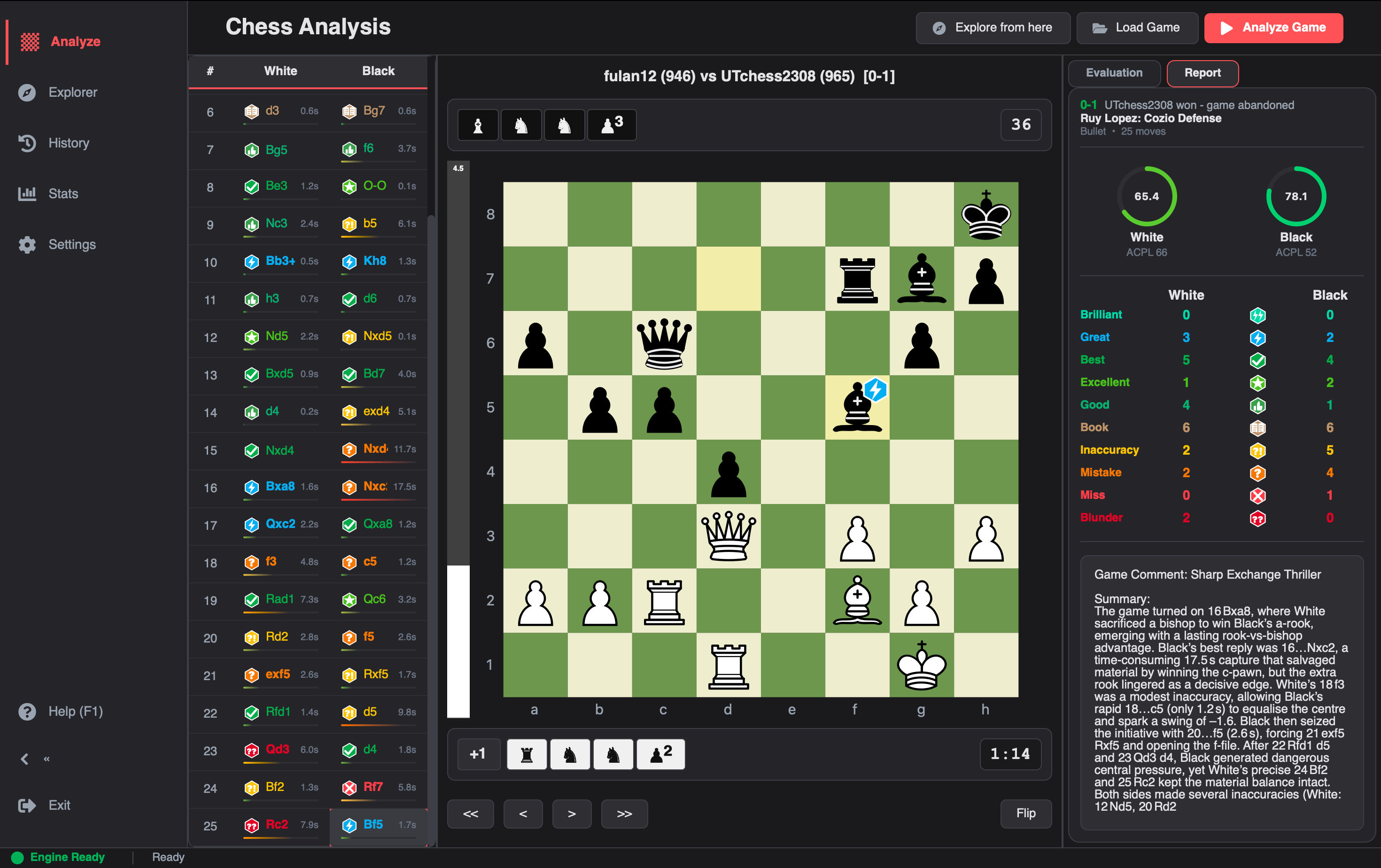
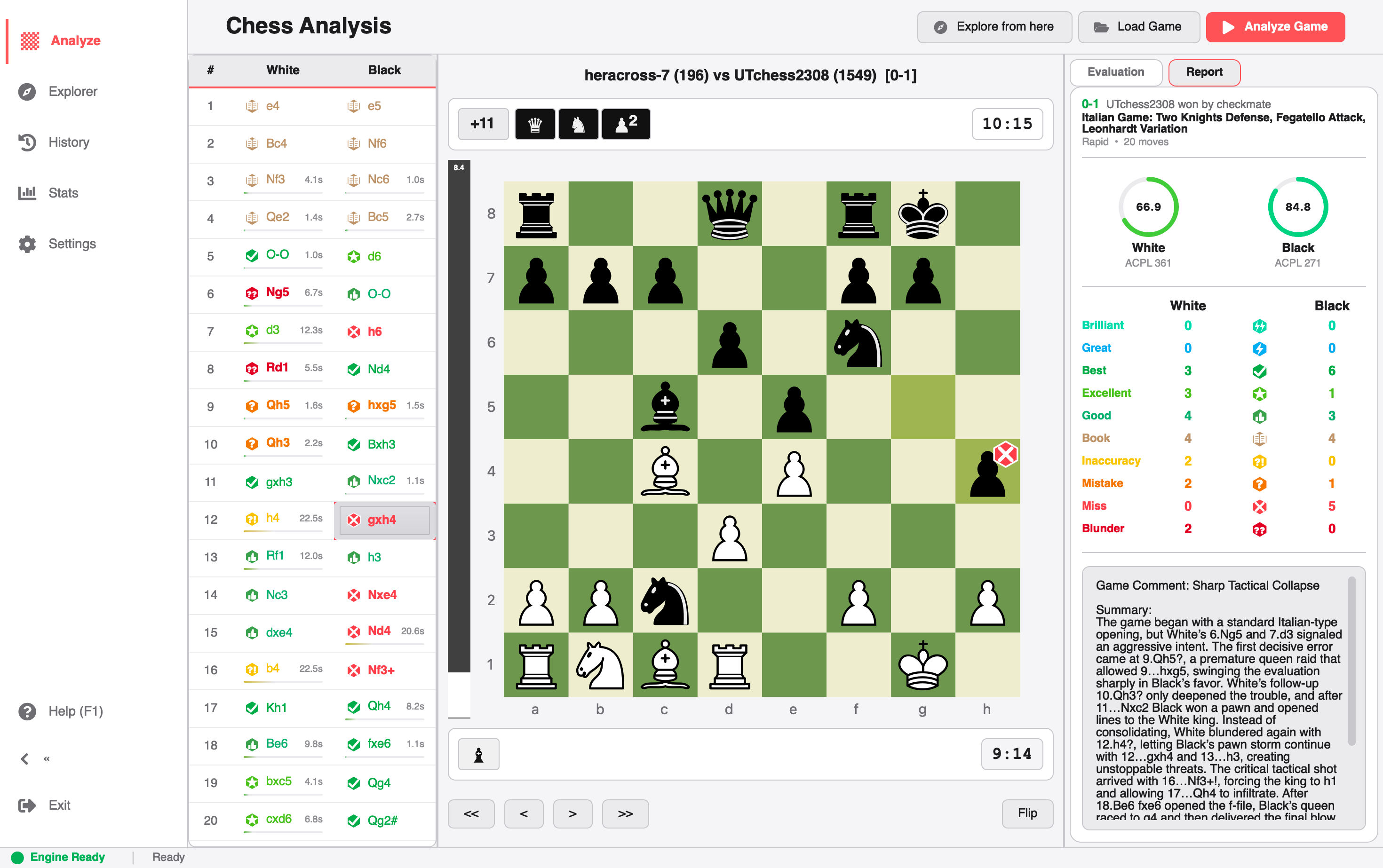
Analysis Dashboard in Dark vs Light Mode
How the theme engine works:
Tailored High-Contrast Boards: Board squares, coordinate numbers, and legal move indicators are dynamically balanced for clear legibility under bright sunlight.
Zero Restart Live Repainting: When you switch between Dark Mode and Light Mode (or change your accent color to Electric Cyan or Emerald), the entire app repaints immediately without needing a restart.
Consistent Styling: Every screen — move lists, report cards, evaluation graphs, and settings — has been carefully tuned to look clean and native in both dark and light modes without awkward borders or color flashes.
Live Move-by-Move Progressive Analysis
In previous versions, running full game analysis meant waiting in silence. You'd click Analyze, the worker thread would churn through the entire game at depth 18, and only after the very last move finished would the move list, classification badges, and evaluation bar suddenly appear.
If you were analyzing a 90-move marathon, you spent 30+ seconds looking at a progress bar.
In v2.3.0, analysis streams progressively in real time.
As Stockfish evaluates each move:
The Move List updates immediately with the move's classification badge (Brilliant, Great, Best, Inaccuracy, Mistake, or Blunder).
The Evaluation Bar animates live to the new centipawn score or mate distance.
The Best Move Arrow and candidate line populate on the board.
You can start inspecting early moves while the background engine continues analyzing the endgame.
You no longer have to wait for the whole game to finish before reviewing what went wrong in your opening.
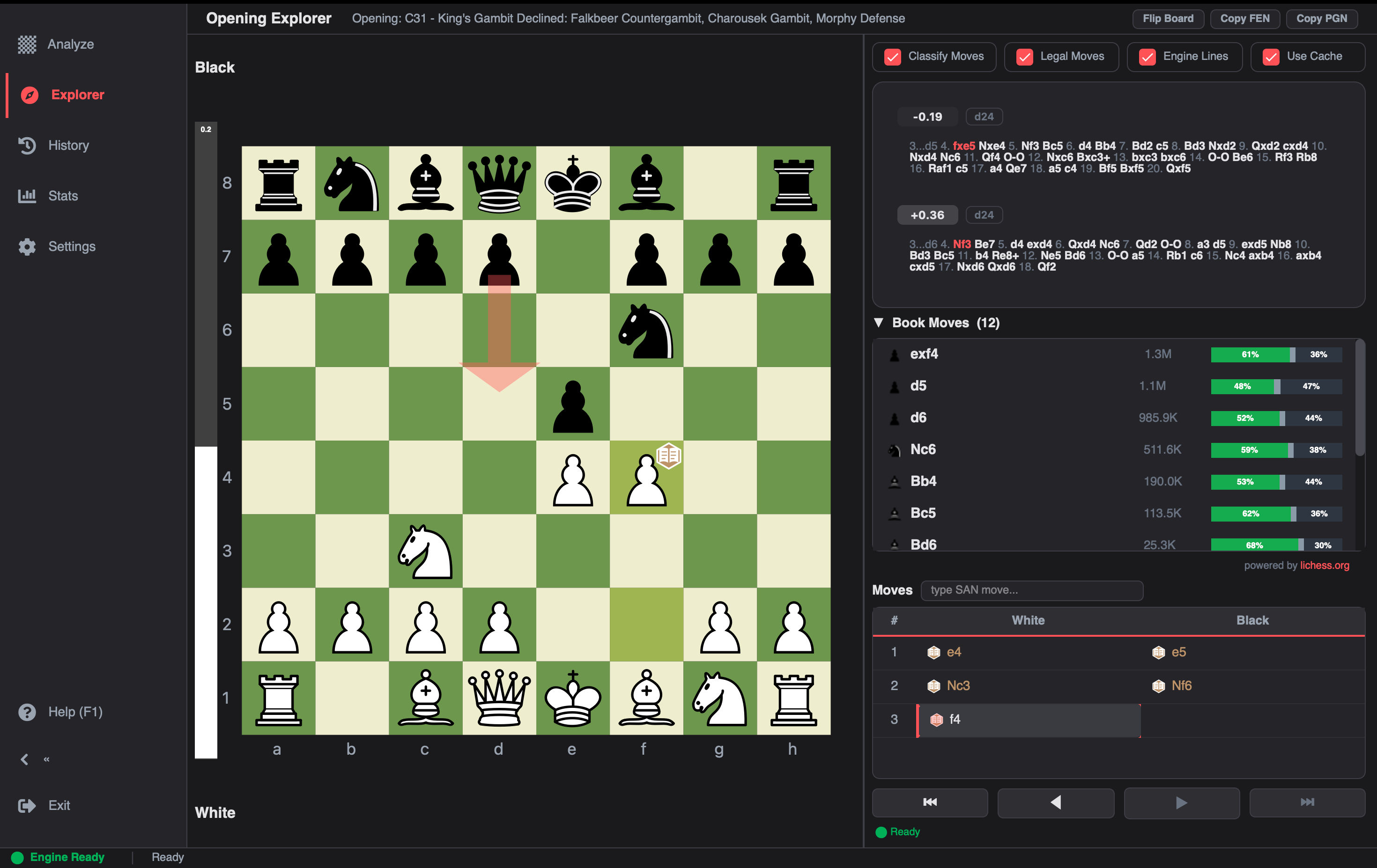
Lichess Opening Explorer & Ratio Bars
Understanding opening theory requires context: Is this move actually played by Masters? What is the statistical win rate?
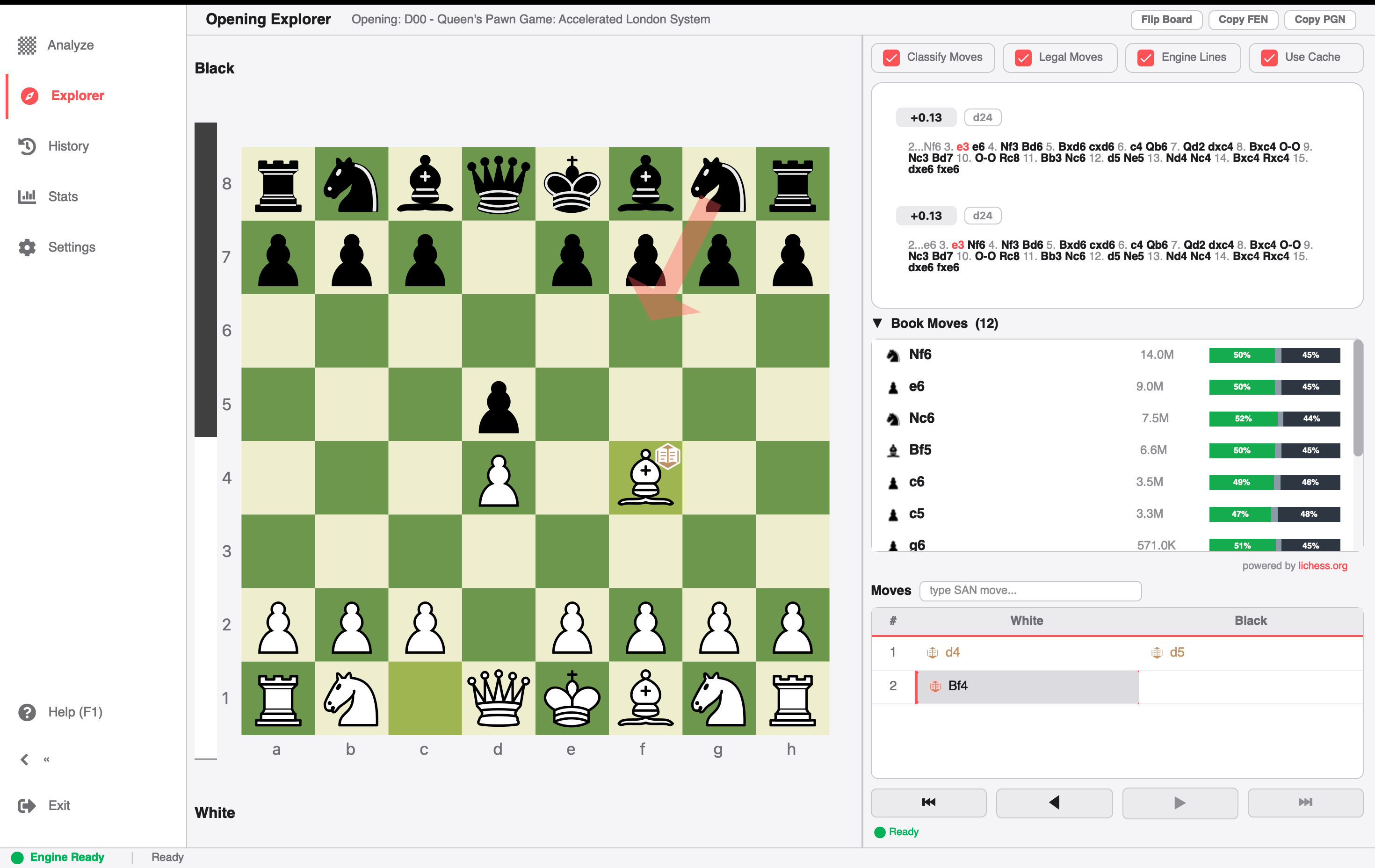
v2.3.0 integrates the Lichess Opening Explorer directly into the desktop client.
Lichess Opening Explorer with Ratio Bars
Key Explorer Capabilities:
Dual Database Lookups: Switch between the Lichess Masters Database (curated grandmaster games dating back to 1952) and the Lichess Public Database (millions of rated online games filtered by rating tier).
Color-Coded Win/Draw/Loss Ratio Bars: Each candidate move displays an intuitive triple-segmented bar showing the exact percentage distribution of White Wins (green), Draws (gray), and Black Wins (blue/red).
Instant Local Caching: Lookups are automatically saved locally on your device. When exploring common opening branches like the Sicilian Defense or Ruy Lopez, moves load instantly without waiting on network requests.
Independent Board Exploration: Freely play moves on the explorer board, view master game examples, and test opening alternatives without altering your active game analysis.
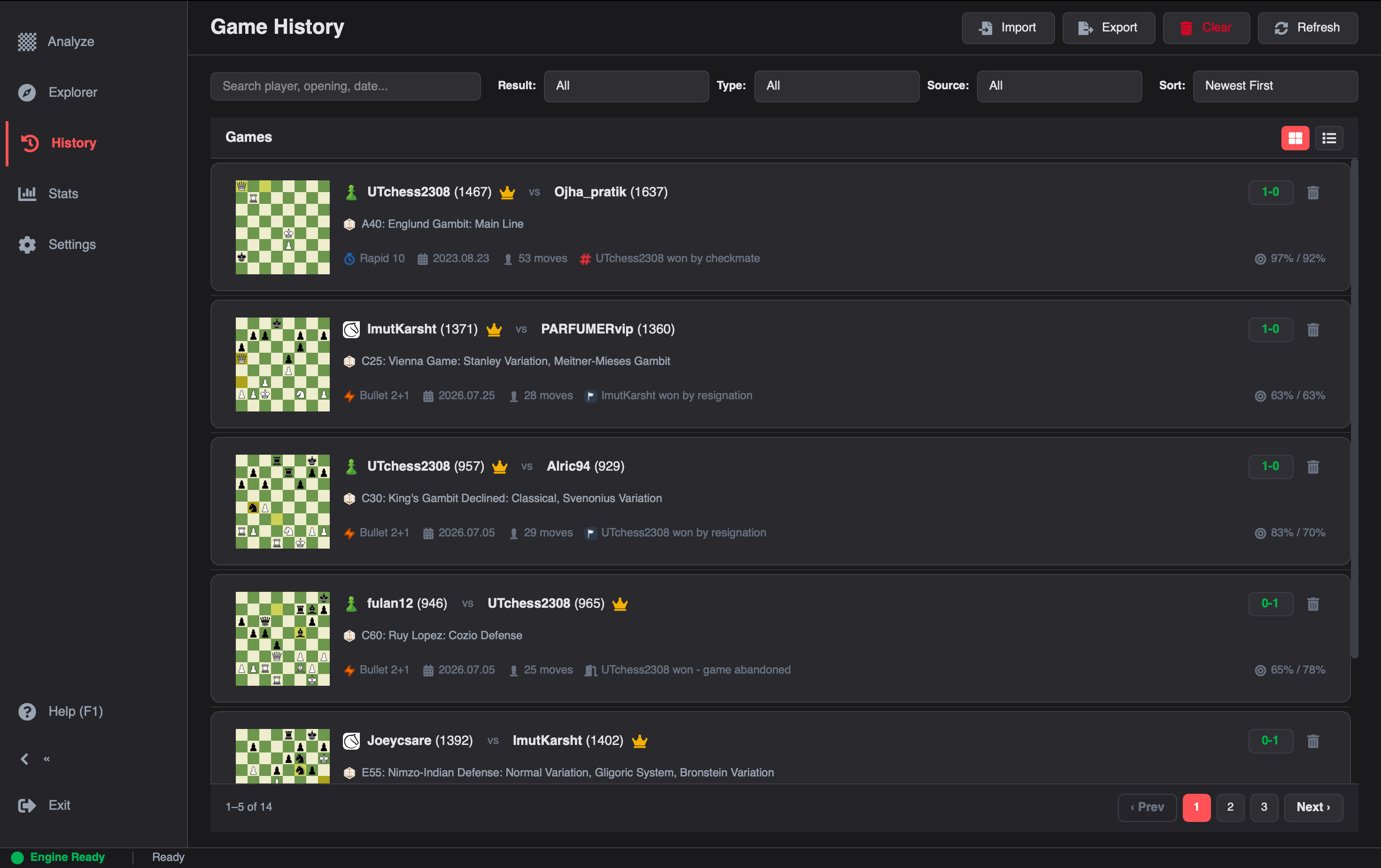
Redesigned History View: Detailed Cards & Compact Table
Your game history shouldn't just be an unsearchable dump of PGNs. In v2.3.0, we completely reimagined the History View.
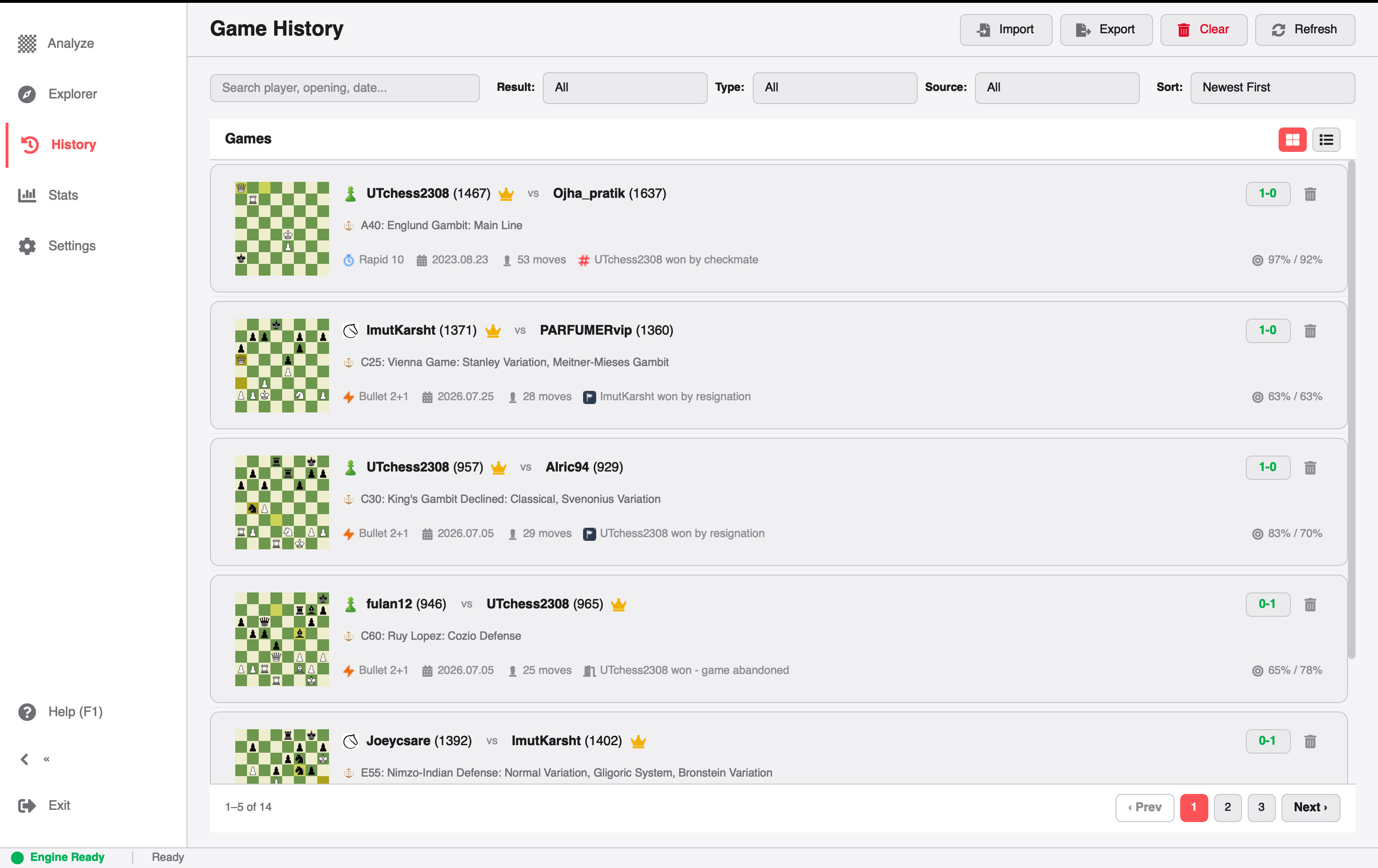
Redesigned Game History
New History Features:
Card vs. Table View Toggle: Switch between rich Detailed Game Cards (showing player avatars, ratings, accuracy meters, ECO codes, and opening names) and a streamlined Compact Table Mode for scanning hundreds of games at high speed.
Time Control Badges: Games are automatically tagged with distinct badges for Bullet, Blitz, Rapid, and Classical.
Date Range Filtering: Filter your local archive by specific date brackets (e.g. "Last 7 Days", "This Month", or custom date spans) to review specific tournament runs or training sessions.
No-Scroll Pagination: Clean, snappy page-by-page browsing with fixed controls, preventing erratic vertical page jumps when navigating deep archives.
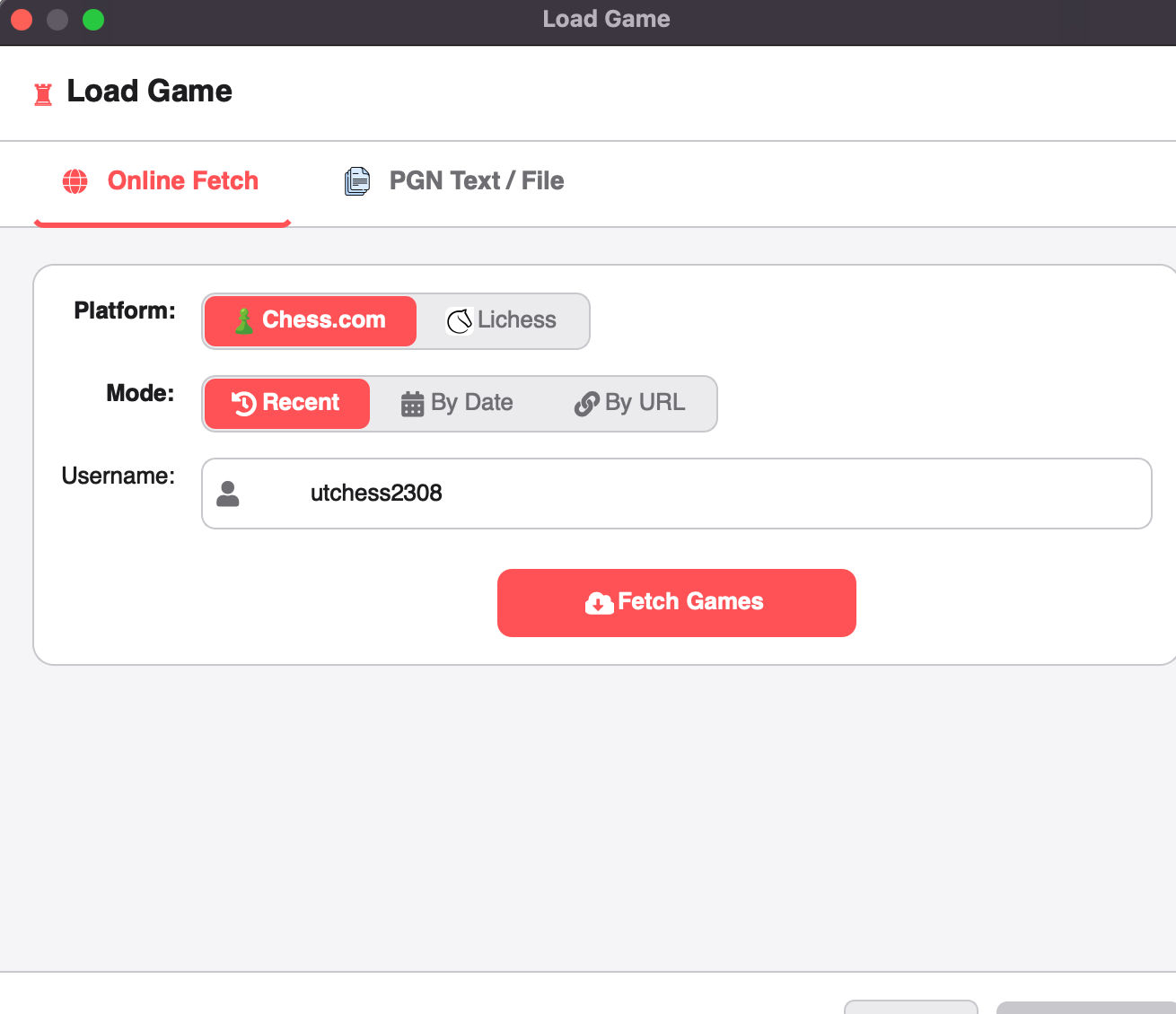
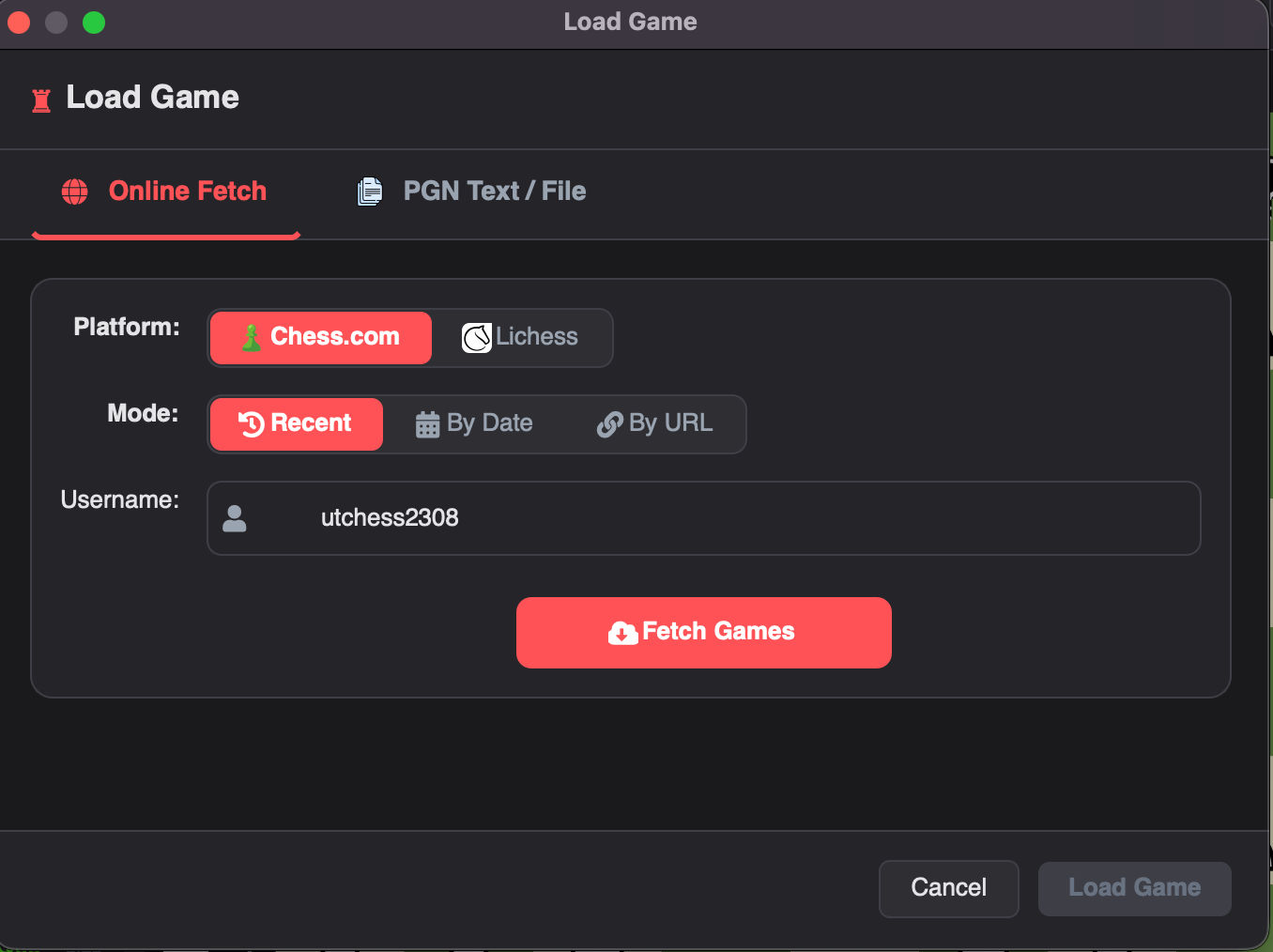
Enhanced Online Game Import & URL Loading
Loading games from Chess.com and Lichess has been refined for speed and precision.
Online Game Loader
Load Directly via URL or Game ID: You can now paste a full Chess.com or Lichess game link directly into the loader (e.g. https://lichess.org/a8K9xYz2 or https://www.chess.com/game/live/123456789). The app resolves the game metadata and loads the PGN immediately.
Date-Filtered Archives: Instead of blindly pulling the last 10 games, you can specify an exact year and month to retrieve past matches from your online account.
Auto-Caching: Once fetched, games are saved locally on your computer. Opening the same game again is instantaneous and works completely offline.
Automatic Game Termination Detection
Have you ever looked at a game where the result said 1-0, but you couldn't tell whether White checkmated Black, Black flagged on time, or Black resigned after a blunder?
In v2.3.0, the app automatically analyzes how the game ended.
The engine inspects the final board position, clock times, and move history to identify the exact cause of conclusion and displays custom visual badges for:
⚔️ Checkmate
🏳️ Resignation
⏱️ Timeout / Flag Fall
🤝 Stalemate
🔄 Threefold Repetition & 50-Move Rule
🛡️ Insufficient Material
🚪 Abandonment
This also feeds directly into our redesigned POV-Aware Result Banner, which calculates whether you won or lost based on which color you were playing, rather than simply stating "White won".
Sleek Collapsible Sidebar & Refined Iconography
To give your chessboard and analysis graphs maximum breathing room, v2.3.0 introduces a flexible workspace with a collapsible sidebar and brand-new iconography:
Sleek Collapsible Sidebar: With a single click, you can collapse the sidebar into a compact, icon-only rail. The chessboard, move list, and evaluation chart immediately expand to utilize the full width of your display — ideal for laptops and focused review sessions.
Modernized Icon Updates: We replaced older iconography with a unified, crisp set of modern vector icons across the sidebar navigation, action toolbars, tabs, and move controls. Every icon renders razor-sharp on high-DPI and Retina displays in both dark and light themes.
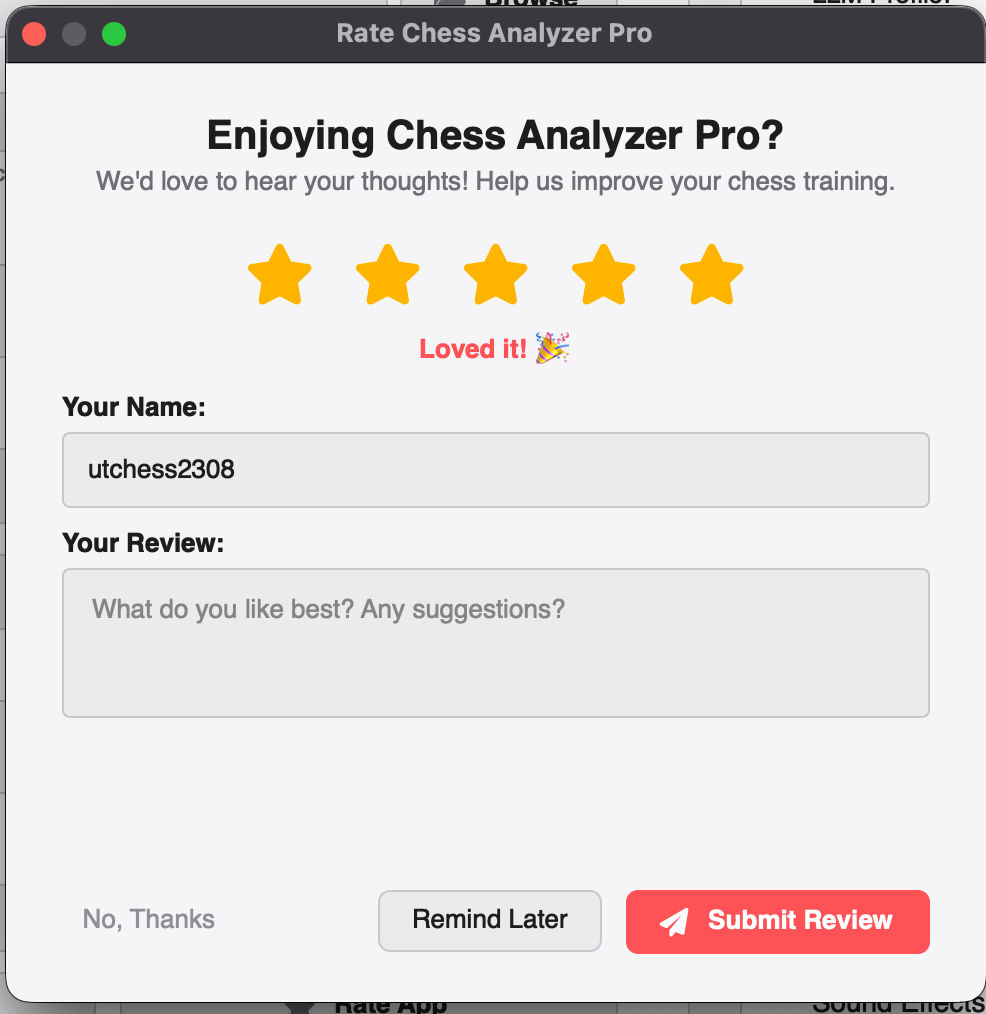
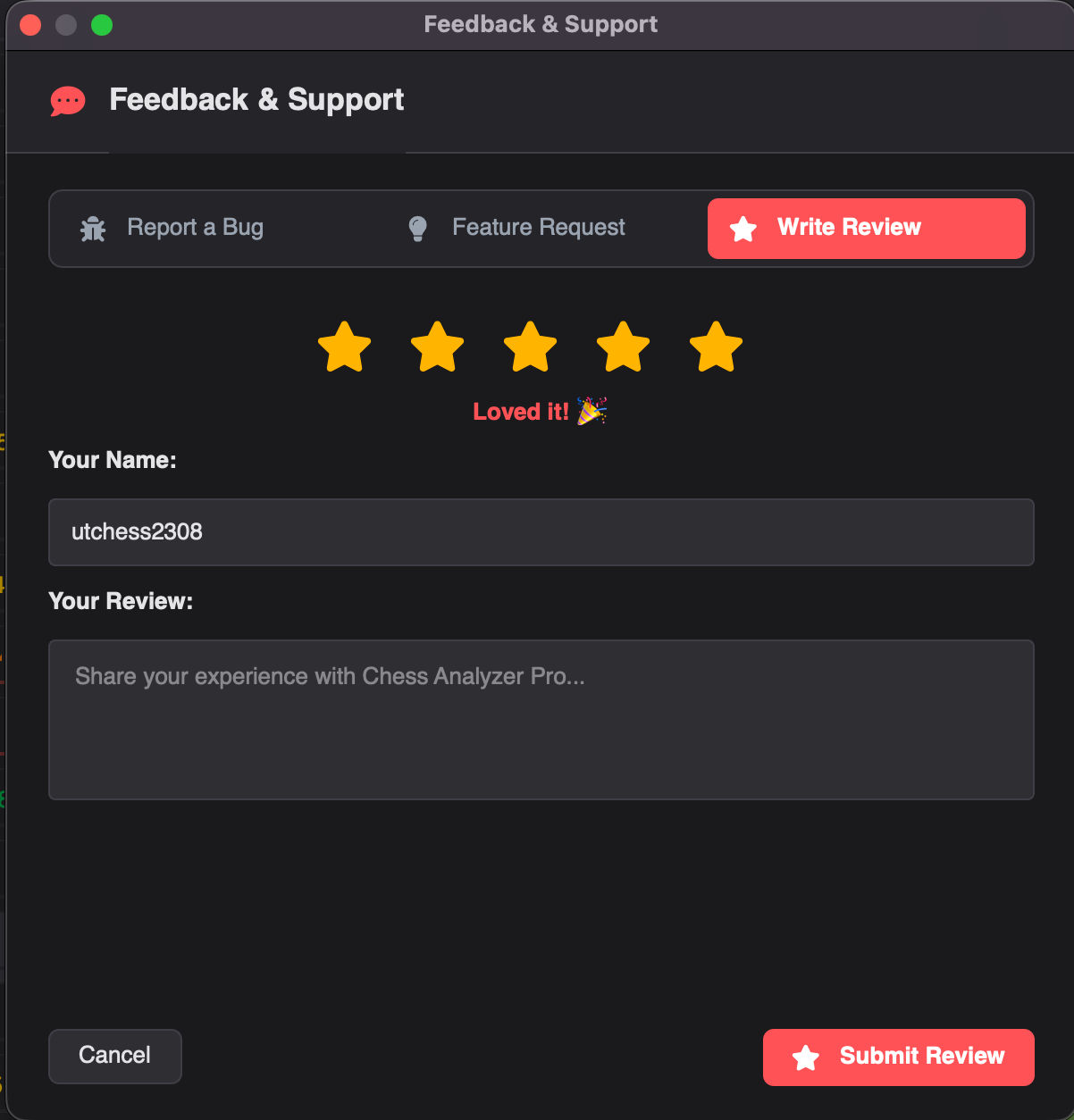
In-App Reviews & Feedback System
Opening GitHub, signing in, and filling out an issue template is annoying when you just want to report a crash or suggest a small tweak.
v2.3.0 adds a built-in Feedback & Review Modal:
In-App Feedback & Reviews
3 Dedicated Channels: Switch between Bug Reports, Feature Requests, and User Reviews.
1-Click Diagnostic Logs: When reporting a bug, you can check an option to automatically attach anonymized system logs and engine crash traces. This helps us reproduce and fix bugs in hours instead of exchanging ten emails asking what happened.
Gentle Milestone Prompt: After analyzing 3 games, a polite dialog asks how your experience has been. It never interrupts you during a game or analysis session, and once dismissed, it respects your choice.
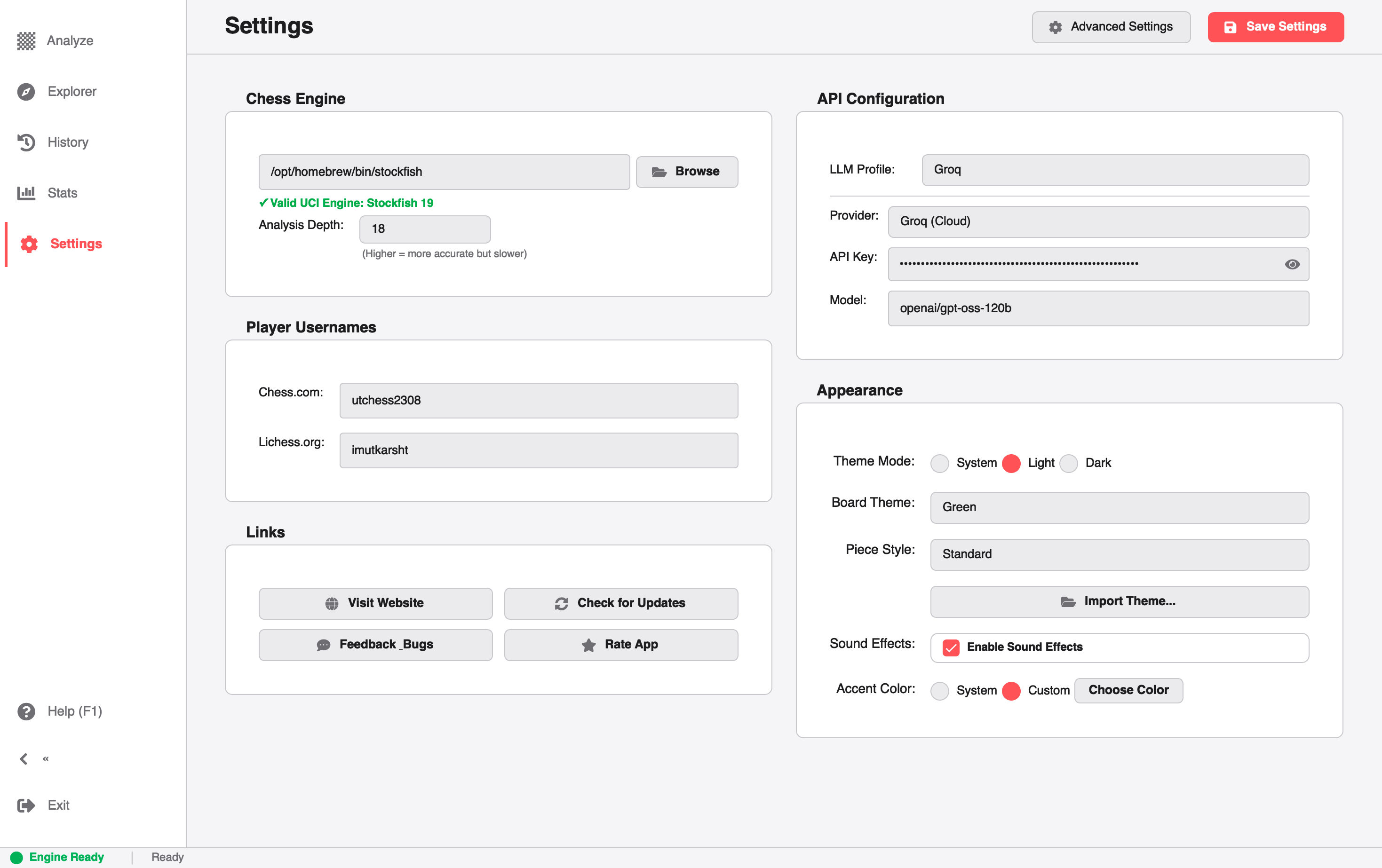
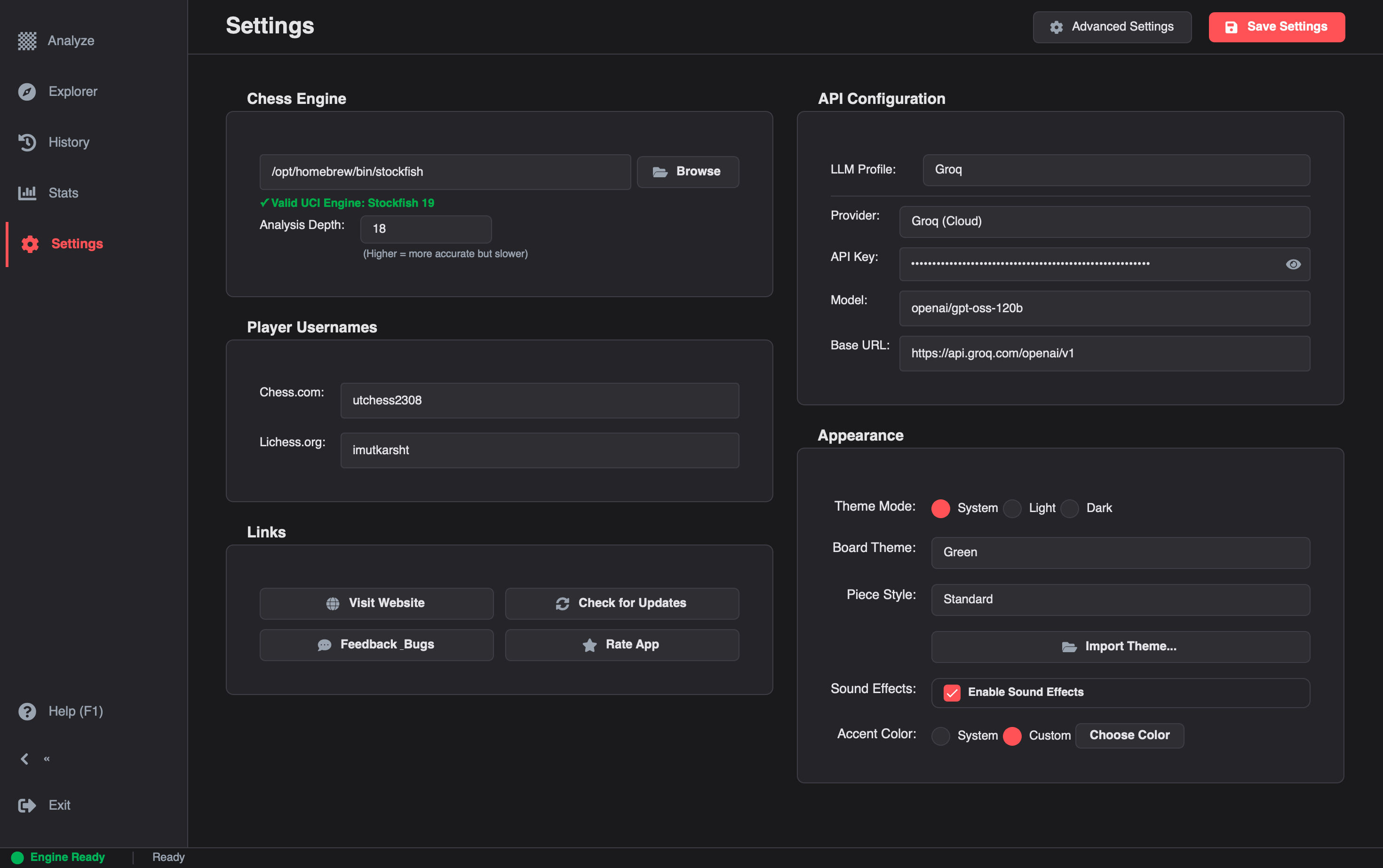
Card-Based Settings with Sliders & Dedicated Controls
We completely overhauled the Settings view with clean surface cards, replacing raw numeric text fields with tactile, intuitive UI components:
Modernized Settings Interface
Interactive Sliders Instead of Text Inputs: You no longer need to type numbers into raw text boxes. Engine analysis depth, CPU thread count, hash memory allocation (MB), and live analysis update intervals are now controlled using responsive sliders with live value badges.
Segmented Pill Selectors & Steppers: Easily toggle between Basic and Advanced settings modes, pick piece sets, and select engine options with instant visual feedback.
Custom Toast Alerts: We replaced jarring system popups with smooth, non-blocking floating notifications.
High-Contrast Eval Graph Pin: The move cursor pin on the evaluation graph now uses an electric cyan marker, making it instantly distinguishable against both light and dark backgrounds.
Circular Accuracy Gauges: Revamped report cards with circular accuracy meters and color-coded performance breakdowns.
Under the Hood & Bug Fixes
Behind the visual updates, v2.3.0 includes critical reliability improvements:
Stockfish Downloader Resilience: Fixed automatic engine download failures caused by asset naming changes on the official Stockfish releases page across Apple Silicon Macs, Intel Macs, Windows, and Linux.
POV Result Calculation: Fixed an issue where the game result banner occasionally displayed a defeat when playing as Black in winning positions.
Legal Move Indicators: Fixed a visual glitch where legal move destination dots appeared jagged or discolored on certain displays.
Fresh Re-Analysis: Re-analyzing an existing game with altered engine depth settings now immediately calculates fresh evaluations without using stale cache.
Smoother Navigation: Refactored internal page loading so switching between the board, history, and explorer views feels instantaneous.
What's Next
Based on recent feedback and responses, I'm motivated to keep building and have already started planning the next updates:
Improved Stats: Expanding performance tracking and player statistics over time.
Improved AI Features for Move Explanation: Better AI-powered explanations to help you understand why a move was a mistake or what the better alternative was.
Game Exports: More options to export and share your analyzed games.
If you run into any quirks or have ideas, feel free to use the in-app feedback dialog or leave a review on the website.
Upgrading
If you already have Chess Analyzer Pro installed, the auto-updater will prompt you on startup.
If you are downloading fresh or updating manually:
Windows:.exe installer (Includes auto-updater and desktop shortcuts)
macOS:.dmg (Universal binary for Apple Silicon M1/M2/M3/M4 & Intel)
Linux:.AppImage (Self-contained, works across Ubuntu, Fedora, Arch, and Debian)
If you find Chess Analyzer Pro useful, please star the project on GitHub — it helps more chess players discover a free, open-source alternative to paid subscriptions!
Try Chess Analyzer Pro
Analyze games with Stockfish offline, review blunders, and track your performance—100% free.
 Download